Pages

Wednesday, November 23, 2011

Refreshing AppV Application List


Sometimes new/ updated software is deployed during a business day and you want to have access immediately without rebooting. This purpose of this blog post is to show end-users the simple steps needed to refresh their applications.

The instructions given in this blog post are aimed at end-users.

Locate the "Show Hidden Icons" button at the bottom right of your task bar;

Left-click the icon to show all the "hidden" icons.

Next locate the "Microsoft Application Virtualization Desktop Client" icon, this is typically box-like and yellow;


Right-click this icon;


Select "Refresh Applications".

The refresh will typically take a few seconds but any new or updated applications will then appear under your start menu.

Tuesday, November 22, 2011

Noetix: Removing Obsolete Columns at R12

This blog post includes a script-generating piece of PL/SQL that will write a series of scripts for you that will remove all the obsolete columns from your Noetix Views following a R12 upgrade.

For example if you look at the Finance views for Payables then you will see the column "Set_Of_Books_Name". Oracle have replaced sets of books in R12 so this column is no longer relevant. Noetix, rather than removing the column, have changed it so that rather than displaying data it just displays the results of a TO_CHAR(NULL) function call - i.e. Nothing.

If you speak to Noetix they will tell you that this allows your code to work across versions *however* in our experience of an R12 upgrade all this allowed was code that needed re-pointing to the new structures to *appear* to work. In the specific case of significant change like this experience has shown me that it's better to have everything collapsing in a big heap than appearing to work when it doesn't!

The following SQL detects the new "obsolete" columns at R12;

select n.view_label, n.column_label, n.query_position
  from n_view_column_templates n
 where n.column_expression like '%(NULL)%'
   and n.include_flag = 'Y'
   and n.product_version like '12%'
   and not exists (select 1
          from n_view_column_templates t
         where t.column_expression not like '%(NULL)%'
           and t.include_flag = 'Y'
           and t.product_version like '12%'
           and t.view_label = n.view_label
           and t.column_label = n.column_label)
 order by n.view_label, n.column_label, n.query_position

When you run it it will give you some idea of the extent of your problem (which will obviously be more significant the more you use oracle - for us this query returned move than 5,000 rows).

For every record returned by this query the script will generate output. In most cases there is a single query for each of the columns so you will see something like;

@utlspon ap_checks_set_of_books_name_upd_xu2
 
UPDATE n_view_column_templates
   SET product_version = '8',
       last_update_date = TO_DATE('17-NOV-2011'),
       last_updated_by = 'A Pellew'
 WHERE UPPER(view_label) = UPPER('AP_Checks')
   AND UPPER(column_label) = UPPER('Set_Of_Books_Name')
   AND QUERY_POSITION = 1
   AND PRODUCT_VERSION LIKE '12%'
;
 
COMMIT;
 
@utlspoff
----------------------------------------

In this case this is updating the view template AP_Checks, and moving the product_version of the "Set_Of_Books_Name" column back to version 8 - this will prevent it being picked up during a regenerate.

In the case of multiple queries the script will generate something similar to;

@utlspon ap_invoice_distributions_posted_amount_upd_xu2
 
UPDATE n_view_column_templates
   SET product_version = '8',
       last_update_date = TO_DATE('17-NOV-2011'),
       last_updated_by = 'A Pellew'
 WHERE UPPER(view_label) = UPPER('AP_Invoice_Distributions')
   AND UPPER(column_label) = UPPER('Posted_Amount')
   AND QUERY_POSITION = 4
   AND PRODUCT_VERSION LIKE '12%'
;
UPDATE n_view_column_templates
   SET product_version = '8',
       last_update_date = TO_DATE('17-NOV-2011'),
       last_updated_by = 'A Pellew'
 WHERE UPPER(view_label) = UPPER('AP_Invoice_Distributions')
   AND UPPER(column_label) = UPPER('Posted_Amount')
   AND QUERY_POSITION = 5
   AND PRODUCT_VERSION LIKE '12%'
;
 
COMMIT;
 
@utlspoff
----------------------------------------

This is removing the column "Posted_Amount" from the "AP_Invoice_Distributions" template where it appears in the 4th and 5th query positions.

The script is given below;

declare
  v_OldViewLabel   n_view_column_templates.view_label%TYPE := '@';
  v_OldColumnLabel n_view_column_templates.column_label%TYPE := '@';

  v_LastUpdateDate n_view_column_templates.last_update_date%TYPE := SYSDATE;
  v_LastUpdatedBy  n_view_column_templates.last_updated_by%TYPE := 'A Pellew';
begin
  for v_Data in (select n.view_label, n.column_label, n.query_position
                   from n_view_column_templates n
                  where n.column_expression like '%(NULL)%'
                    and n.include_flag = 'Y'
                    and n.product_version like '12%'
                    and not exists
                  (select 1
                           from n_view_column_templates t
                          where t.column_expression not like '%(NULL)%'
                            and t.include_flag = 'Y'
                            and t.product_version like '12%'
                            and t.view_label = n.view_label
                            and t.column_label = n.column_label)
                  order by n.view_label, n.column_label, n.query_position) loop
    if v_Data.view_label <> v_OldViewLabel or
       v_Data.column_label <> v_OldColumnLabel then
      if v_OldViewLabel <> '@' then
        dbms_output.put_line(' ');
        dbms_output.put_line('COMMIT; ');
        dbms_output.put_line(' ');
        dbms_output.put_line('@utlspoff ');
        dbms_output.put_line(LPAD('-', 40, '-'));
      end if;
      dbms_output.put_line('@utlspon ' || lower(v_Data.view_label) || '_' ||
                           lower(v_Data.column_label) || '_upd_xu2 ');
      v_OldViewLabel   := v_Data.view_label;
      v_OldColumnLabel := v_Data.column_label;
      dbms_output.put_line(' ');
    end if;
    dbms_output.put_line('UPDATE n_view_column_templates ');
    dbms_output.put_line('   SET product_version = ''8'', ');
    dbms_output.put_line('       last_update_date = TO_DATE(''' ||
                         TO_CHAR(v_LastUpdateDate, 'DD-MON-YYYY') ||
                         '''), ');
    dbms_output.put_line('       last_updated_by = ''' || v_LastUpdatedBy ||
                         ''' ');
    dbms_output.put_line(' WHERE UPPER(view_label) = UPPER(''' ||
                         v_Data.view_label || ''') ');
    dbms_output.put_line('   AND UPPER(column_label) = UPPER(''' ||
                         v_Data.column_label || ''') ');
    dbms_output.put_line('   AND QUERY_POSITION = ' ||
                         TO_CHAR(v_Data.Query_Position));
    dbms_output.put_line('   AND PRODUCT_VERSION LIKE ''12%'' ');
    dbms_output.put_line(';');
  end loop;
  dbms_output.put_line(' ');
  dbms_output.put_line('COMMIT; ');
  dbms_output.put_line(' ');
  dbms_output.put_line('@utlspoff ');
  dbms_output.put_line(LPAD('-', 40, '-'));
end;


You should change "A Pellew" at the top to be your own name!

NOTE: Two files are generated in error (due to the base data from Noetix not following their own standards - or at least not following any standards they tell developers to follow!). The two files (in our installation, there might be others in yours) are;

ar_std_rcpt_dist_sla_gl_je_line_item_number_upd_xu2.sql (Receivables)
fa_adjustments_sla_gl_je_acct$_upd_xu2.sql (Fixed Assets)

When you run your regenerate after adding all the files errors quickly show up. Just stop using files which prevent your regenerate from working (did that need saying?!). If you consider that we added almost 500 files finding 2 with errors is a pretty good error rate - imagine trying to write them all by hand.


Friday, November 18, 2011

SSRS: Displaying Values in a "Allow Multiple Values" Parameter as a String

This post provides two simple formulas; the first to provide something you could use in a page header (a summary of the selected values) and the other to provide a complete list of the selected values - something you could use on the final page of a report.

Let's assume you have a fairly simple dataset that contains the years 1980 to 2011. You have a parameter that uses this dataset as the source for it's "Available Values" list and allows the user to multi-select years.

Now to be helpful to your users you echo back to them the parameters they used to run the report in the reports output (always a good idea; gives helpdesk something to work with when the user wants to report a problem!).

The following block of code will convert the list of the users selected years into a English string that can be displayed;

=IIF(
  Count(Fields!KEY.Value, "LIST_YEARS") =
        Parameters!YEARLIST.Count, "All",
    IIF(
       Parameters!YEARLIST.Count = 1,
       Join(Parameters!YEARLIST.Label, ""),
       IIF(
         Parameters!YEARLIST.Count > 10,
         "Multiple",
         Replace(
           Left(
             Join(
               Parameters!YEARLIST.Label, "@@@@@"),
             InStrRev(
               Join(
                 Parameters!YEARLIST.Label,
                   "@@@@@"),
               "@@@@@") - IIF( Parameters!YEARLIST.Count < 2, 0, 1)),
           "@@@@@",
           ", ") + ", or " +
           Parameters!YEARLIST.Label(
             Parameters!YEARLIST.Count-1))))


This assumes your parameter is called YEARLIST and the dataset you are using for lookups is called LIST_YEARS and has the key field KEY.

The output follows a few simple rules; If the user has selected all records in the drop down display "All", if they have selected more than 10 items show "Multiple", otherwise display the items comma-separated and between the final two items replace the comma with ", or ".

Assuming you just want the list of all values (for the report footer) then you can use;

=IIF(Parameters!YEARLIST.Count = 1, Parameters!YEARLIST.Label(0), Replace(
    Left(
        Join(
            Parameters!YEARLIST.Label, "@@@@@"),
            InStrRev(
                Join(
                    Parameters!YEARLIST.Label,
                    "@@@@@"),
                "@@@@@") -
            IIF( Parameters!YEARLIST.Count < 2, 0, 1)),
    "@@@@@",
    ", ") +
    ", or " +
    Parameters!YEARLIST.Label( Parameters!YEARLIST.Count-1))


This will provide you with a complete list of the years selected.

Thursday, November 17, 2011

Noetix: Omitting Columns from the View Templates

The script works by updating the PRODUCT_VERSION column in the Noetix view with a version you aren't running (version 8) so that when the regenerate happens the column is not displayed. To use the script below you need to update the v_ColumnName variable with the column you wish to remove.

The script will then generate a "removal" script for each occurrence of the column in the system. Each of the ones you want to use then needs to be copy/pasted into their own file and called from XU2. A line of dashes marks where the place between scripts.

Sample output is included after the PL/SQL block;

declare
  v_ColumnName all_tab_columns.COLUMN_NAME%TYPE := UPPER('Lot_Status');
begin
  for v_Data in (SELECT DISTINCT nvct.column_label, nvct.view_label
                   FROM n_view_column_templates nvct
                  WHERE UPPER(nvct.column_label) = v_ColumnName
                  ORDER BY nvct.column_label, nvct.view_label) loop
    dbms_output.put_line('@utlspon ' ||
                         lower(v_Data.view_label) || '_' ||
                         lower(v_Data.column_label) || '_upd_xu2 ');
    dbms_output.put_line(' ');
    dbms_output.put_line('UPDATE n_view_column_templates ');
    dbms_output.put_line('   SET product_version = ''8'' ');
    dbms_output.put_line(' WHERE UPPER(view_label) = UPPER(''' ||
                         v_Data.view_label || ''') ');
    dbms_output.put_line('   AND UPPER(column_label) = UPPER(''' ||
                         v_Data.column_label || ''') ');
    dbms_output.put_line(';');
    dbms_output.put_line(' ');
    dbms_output.put_line('COMMIT; ');
    dbms_output.put_line(' ');
    dbms_output.put_line('@utlspoff ');
    dbms_output.put_line(LPAD('-', 40, '-'));
  end loop;
end;


On our system (where we use process manufacturing) this generates the following output;

@utlspon gmi_inv_alloc_unalloc_base_lot_status_upd_xu2
 
UPDATE n_view_column_templates
   SET product_version = '8'
 WHERE UPPER(view_label) = UPPER('GMI_Inv_Alloc_Unalloc_Base')
   AND UPPER(column_label) = UPPER('Lot_Status')
;
 
COMMIT;
 
@utlspoff
----------------------------------------
@utlspon gmi_inv_transactions_lot_status_upd_xu2
 
UPDATE n_view_column_templates
   SET product_version = '8'
 WHERE UPPER(view_label) = UPPER('GMI_Inv_Transactions')
   AND UPPER(column_label) = UPPER('Lot_Status')
;
 
COMMIT;
 
@utlspoff
----------------------------------------
@utlspon gmi_onhand_inv_by_lot_lot_status_upd_xu2
 
UPDATE n_view_column_templates
   SET product_version = '8'
 WHERE UPPER(view_label) = UPPER('GMI_Onhand_Inv_By_Lot')
   AND UPPER(column_label) = UPPER('Lot_Status')
;
 
COMMIT;
 
@utlspoff
----------------------------------------
@utlspon gmi_unallocated_inventory_lot_status_upd_xu2
 
UPDATE n_view_column_templates
   SET product_version = '8'
 WHERE UPPER(view_label) = UPPER('GMI_Unallocated_Inventory')
   AND UPPER(column_label) = UPPER('Lot_Status')
;
 
COMMIT;
 
@utlspoff
----------------------------------------
@utlspon inv_alloc_unalloc_base_lot_status_upd_xu2
 
UPDATE n_view_column_templates
   SET product_version = '8'
 WHERE UPPER(view_label) = UPPER('INV_Alloc_Unalloc_Base')
   AND UPPER(column_label) = UPPER('Lot_Status')
;
 
COMMIT;
 
@utlspoff
----------------------------------------
@utlspon inv_item_onhand_by_lot_lot_status_upd_xu2
 
UPDATE n_view_column_templates
   SET product_version = '8'
 WHERE UPPER(view_label) = UPPER('INV_Item_Onhand_By_Lot')
   AND UPPER(column_label) = UPPER('Lot_Status')
;
 
COMMIT;
 
@utlspoff
----------------------------------------
@utlspon inv_lot_details_lot_status_upd_xu2
 
UPDATE n_view_column_templates
   SET product_version = '8'
 WHERE UPPER(view_label) = UPPER('INV_Lot_Details')
   AND UPPER(column_label) = UPPER('Lot_Status')
;
 
COMMIT;
 
@utlspoff
----------------------------------------
@utlspon inv_lot_transactions_lot_status_upd_xu2
 
UPDATE n_view_column_templates
   SET product_version = '8'
 WHERE UPPER(view_label) = UPPER('INV_Lot_Transactions')
   AND UPPER(column_label) = UPPER('Lot_Status')
;
 
COMMIT;
 
@utlspoff
----------------------------------------
@utlspon inv_serial_number_trans_lot_status_upd_xu2
 
UPDATE n_view_column_templates
   SET product_version = '8'
 WHERE UPPER(view_label) = UPPER('INV_Serial_Number_Trans')
   AND UPPER(column_label) = UPPER('Lot_Status')
;
 
COMMIT;
 
@utlspoff
----------------------------------------
@utlspon inv_transaction_details_lot_status_upd_xu2
 
UPDATE n_view_column_templates
   SET product_version = '8'
 WHERE UPPER(view_label) = UPPER('INV_Transaction_Details')
   AND UPPER(column_label) = UPPER('Lot_Status')
;
 
COMMIT;
 
@utlspoff
----------------------------------------
@utlspon inv_unallocated_inventory_lot_status_upd_xu2
 
UPDATE n_view_column_templates
   SET product_version = '8'
 WHERE UPPER(view_label) = UPPER('INV_Unallocated_Inventory')
   AND UPPER(column_label) = UPPER('Lot_Status')
;
 
COMMIT;
 
@utlspoff
----------------------------------------

Tuesday, November 8, 2011

Noetix: Extracting a View As A Script

UPDATE 16-DEC-2012: Added in the table n_view_col_property_templates. Where a view is using key flex fields the copying of the view was failing as the additional information (well, for Inventory anyway) was not being populated in this table.

The following script generates source code (i.e. uses DBMS_OUTPUT.PUT_LINE), you will need to copy/paste this into a separate file AND then change the name of the view before you run it (otherwise you will get a lot of duplicate errors).

Five fields are overwritten by this script; Last Updated By/Created By (replaced with the value in the variable at the top), Last Updated Date/Creation Date (set to today), and the product version set to 12+.

To add other tables you can just add calls to "ProcessTable" (rows 91-96) for the additional tables you want to include.

The script is available here (via Google Docs) or is copy/ pasted below;

declare
  v_ViewLabel     n_view_column_templates.view_label%TYPE := 'GMD_Recipes'; -- Must be direct value from table n_views, case sensitive!
  v_LastUpdatedBy n_view_templates.last_updated_by%TYPE := 'A Pellew'; -- The user who performed the last update (i.e. you)

  procedure ProcessTable(v_TableName in varchar2) as
    TYPE rowidRec IS RECORD(
      ri rowid);
    TYPE rowidSet IS TABLE OF rowidRec;
    v_Items rowidSet;

    v_HeaderSQL varchar2(4000);
    v_DataSQL   varchar2(4000);
    v_SQL       varchar2(4000);
    v_result    varchar2(4000);
    procedure AddToHeader(v_Text in varchar) as
    begin
      if length(v_HeaderSQL) > 100 then
        dbms_output.put_line(v_headerSQL);
        v_headerSQL := '  ';
      end if;
      v_headerSQL := v_headerSQL || v_Text;
    end;
  begin
    dbms_output.put_line('-- Performing updates to table ' ||
                         upper(v_tablename));
    EXECUTE IMMEDIATE 'SELECT n.rowid FROM ' || v_TableName ||
                      ' n WHERE n.view_label = ''' || v_ViewLabel || '''' BULK
                      COLLECT
      INTO v_Items;
    for v_Item in v_Items.First .. v_items.Last loop
      v_HeaderSQL := '  ';
      v_DataSQL   := '';
      dbms_output.put_line('INSERT INTO ' || Lower(v_TableName) || ' (');
      for v_Column in (select atc.column_name,
                              atc.data_type,
                              atc.column_id,
                              (select max(atc2.column_id)
                                 from all_tab_columns atc2
                                where atc2.owner = USER
                                  AND atc2.column_name not in
                                      ('INCLUDE_FLAG')
                                  and atc2.table_name = atc.table_name) as max_column_id
                         from all_tab_columns atc
                        where atc.owner = USER
                          and atc.table_name = Upper(v_TableName)
                          AND atc.column_name not in ('INCLUDE_FLAG')
                        order by atc.column_id) loop
        v_SQL := 'SELECT T.' || V_Column.Column_name || ' FROM ' ||
                 Upper(v_TableName) || ' T WHERE T.ROWID = ''' || v_Items(v_Item).ri || '''';
        EXECUTE IMMEDIATE v_SQL
          into v_result;
        if instr(v_Result, '''') > 0 then
          v_Result := Replace(v_result, '''', '''''');
        end if;
        if v_Column.Column_Name in ('LAST_UPDATE_DATE', 'CREATION_DATE') then
          v_result := SYSDATE;
        end if;
        if v_Column.Column_Name IN ('LAST_UPDATED_BY', 'CREATED_BY') then
          v_result := v_LastUpdatedBy;
        end if;
        if v_Column.Column_Name IN ('T_COLUMN_PROPERTY_ID') then
          v_result := '(SELECT MAX(t_column_property_id)+1 FROM n_view_col_property_templates)';
        end if;
    
        if (v_result is not null) then
          if (v_Column.Column_Id = v_Column.Max_Column_Id) then
            v_DataSQL := v_DataSQL || case
                           when v_Column.Data_Type = 'VARCHAR2' then
                            '  ''' || v_result || ''') -- ' || lower(V_Column.Column_name)
                           when v_Column.Data_Type = 'NUMBER' then
                            '  ' || v_result || ') -- ' || lower(V_Column.Column_name)
                           when v_Column.Data_Type = 'DATE' then
                            '  TO_DATE(''' || v_result || ''')) -- ' || lower(V_Column.Column_name)
                           else
                            '** ERROR **' || v_Result
                         end;
            AddToheader(lower(V_Column.Column_name) || ')');
          else
            v_DataSQL := v_DataSQL || case
                           when v_Column.Data_Type = 'VARCHAR2' then
                            '  ''' || v_result || ''', -- ' ||
                            lower(V_Column.Column_name)
                           when v_Column.Data_Type = 'NUMBER' then
                            '  ' || v_result || ', -- ' || lower(V_Column.Column_name)
                           when v_Column.Data_Type = 'DATE' then
                            '  TO_DATE(''' || v_result || '''), -- ' ||
                            lower(V_Column.Column_name)
                           else
                            '** ERROR **' || v_Result
                         end;
            AddToHeader(lower(V_Column.Column_name) || ', ');
            v_DataSQL := v_DataSQL || chr(13);
          end if;
        end if;
      end loop;
      dbms_output.put_line(v_headerSQL);
      dbms_output.put_line('VALUES(');
      dbms_output.put_line(v_DataSQL);
      dbms_output.put_line(';');
      dbms_output.put_line('');
    end loop;
  end;
begin
  dbms_output.put_line('@utlspon ' || lower(v_ViewLabel) || '_xu2');
  dbms_output.put_line('');
  dbms_output.put_line('SET SCAN OFF');
  dbms_output.put_line('');
  ProcessTable('n_view_templates');
  ProcessTable('n_role_view_templates');
  ProcessTable('n_view_query_templates');
  ProcessTable('n_view_table_templates');
  ProcessTable('n_view_where_templates');
  ProcessTable('n_view_column_templates');
  ProcessTable('n_view_col_property_templates');

  dbms_output.put_line('COMMIT;');
  dbms_output.put_line('');  dbms_output.put_line('SET SCAN ON');  dbms_output.put_line('');
  dbms_output.put_line('@utlspoff');
end;

Tuesday, November 1, 2011

SSRS: Changing the Order of Displayed Parameters

This blog post covers a step-by-step guide to changing the order of the parameters in an SSRS report. These worked examples show Report Builder 3 but previous versions are pretty similar.

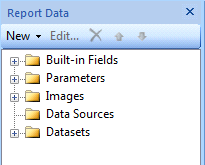
Open the Report in Report Builder and look at the "Report Data" section on the very left of the screen;


SSRS: Report Data Section

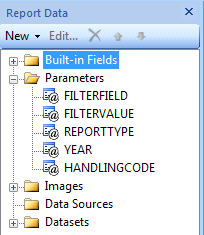
Expand the "Parameters" node in the tree view;


SSRS: Expanded Parameters Node for Report Data
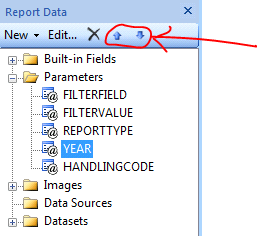
This is now showing a list of all the parameters in the report. The parameter at the top of the list will be displayed first and at the bottom last. Select the parameter you wish to relocate;


SSRS: Highlighting Up/Down Buttons for Parameters
Once you have selected a parameter two tiny blue arrow buttons at the top of the Report Data section become illuminated. These will move the parameter up and down in the list.

Thursday, October 13, 2011

Oracle EBS: Initialising the APPS Environment in PL/SQL

How to set your user, responsibility, etc in PL/SQL to work with APPS functions

This blog post covers a fairly simple PL/SQL block that allows you to initialise your APPS environment from within PL/SQL allowing you to do things like run concurrent requests.

Language (NLS_LANGUAGE and NLS_TERRITORY)

The most important thing to start with is to make sure that your language and the current APPS configured languages and territory are the same in your session as they are on the server. You only need to do this step if you are looking onto a server configured with a different language. For example here in the UK our server is configured as AMERICAN.

To alter your session in PL/SQL you need to use EXECUTE IMMEDIATE;

execute immediate 'alter session set NLS_LANGUAGE = AMERICAN';
execute immediate 'alter session set NLS_TERRITORY = AMERICA';

If you want to see what your current settings are you can query FND_GLOBAL.NLS_LANGUAGE - in our case this turned out to either be GB or null.

Initialising Oracle EBS Environment

Clearly this issue has been around for a long time as Oracle provide a handy API in order to setup the environment. This API is part of the FND_GLOBAL package and is called APPS_INITIALIZE (note the US spelling). This API takes the following parameters;

USER_ID - The ID of the user (from FND_USER)
RESP_ID - The ID of the responsibility (from FND_RESPONSIBILITY)
RESP_APPL_ID - The ID of the application (also from FND_RESPONSIBILITY, APPLICATION_ID column)
SECURITY_GROUP_ID - This has a default value and in most cases you won't need to change it
SERVER_ID - Same with this

Once you have the correct values you can execute the call using the PL/SQL;

APPS.FND_GLOBAL.APPS_INITIALIZE(
  user_id      => v_UserId,
  resp_id      => v_RespId,
  resp_appl_id => v_RespAppId);

If successful you can then query values in FND_GLOBAL.

NOTE: It's worth probably saying that you just need to Initialize the environment - it's quite possible if you have an environment initialised as a lowly user you would still be able to pro grammatically run System Administrator Concurrent Requests with it.