The script works by updating the PRODUCT_VERSION column in the Noetix
view with a version you aren't running (version 8) so that when the
regenerate happens the column is not displayed. To use the script below
you need to update the v_ColumnName variable with the column you wish to
remove.
The script will then generate a "removal" script for
each occurrence of the column in the system. Each of the ones you want
to use then needs to be copy/pasted into their own file and called from
XU2. A line of dashes marks where the place between scripts.
Sample output is included after the PL/SQL block;
declare
v_ColumnName all_tab_columns.COLUMN_NAME%TYPE := UPPER('Lot_Status');
begin
for v_Data in (SELECT DISTINCT nvct.column_label, nvct.view_label
FROM n_view_column_templates nvct
WHERE UPPER(nvct.column_label) = v_ColumnName
ORDER BY nvct.column_label, nvct.view_label) loop
dbms_output.put_line('@utlspon ' ||
lower(v_Data.view_label) || '_' ||
lower(v_Data.column_label) || '_upd_xu2 ');
dbms_output.put_line(' ');
dbms_output.put_line('UPDATE n_view_column_templates ');
dbms_output.put_line(' SET product_version = ''8'' ');
dbms_output.put_line(' WHERE UPPER(view_label) = UPPER(''' ||
v_Data.view_label || ''') ');
dbms_output.put_line(' AND UPPER(column_label) = UPPER(''' ||
v_Data.column_label || ''') ');
dbms_output.put_line(';');
dbms_output.put_line(' ');
dbms_output.put_line('COMMIT; ');
dbms_output.put_line(' ');
dbms_output.put_line('@utlspoff ');
dbms_output.put_line(LPAD('-', 40, '-'));
end loop;
end;
On our system (where we use process manufacturing) this generates the following output;
@utlspon gmi_inv_alloc_unalloc_base_lot_status_upd_xu2
UPDATE n_view_column_templates
SET product_version = '8'
WHERE UPPER(view_label) = UPPER('GMI_Inv_Alloc_Unalloc_Base')
AND UPPER(column_label) = UPPER('Lot_Status')
;
COMMIT;
@utlspoff
----------------------------------------
@utlspon gmi_inv_transactions_lot_status_upd_xu2
UPDATE n_view_column_templates
SET product_version = '8'
WHERE UPPER(view_label) = UPPER('GMI_Inv_Transactions')
AND UPPER(column_label) = UPPER('Lot_Status')
;
COMMIT;
@utlspoff
----------------------------------------
@utlspon gmi_onhand_inv_by_lot_lot_status_upd_xu2
UPDATE n_view_column_templates
SET product_version = '8'
WHERE UPPER(view_label) = UPPER('GMI_Onhand_Inv_By_Lot')
AND UPPER(column_label) = UPPER('Lot_Status')
;
COMMIT;
@utlspoff
----------------------------------------
@utlspon gmi_unallocated_inventory_lot_status_upd_xu2
UPDATE n_view_column_templates
SET product_version = '8'
WHERE UPPER(view_label) = UPPER('GMI_Unallocated_Inventory')
AND UPPER(column_label) = UPPER('Lot_Status')
;
COMMIT;
@utlspoff
----------------------------------------
@utlspon inv_alloc_unalloc_base_lot_status_upd_xu2
UPDATE n_view_column_templates
SET product_version = '8'
WHERE UPPER(view_label) = UPPER('INV_Alloc_Unalloc_Base')
AND UPPER(column_label) = UPPER('Lot_Status')
;
COMMIT;
@utlspoff
----------------------------------------
@utlspon inv_item_onhand_by_lot_lot_status_upd_xu2
UPDATE n_view_column_templates
SET product_version = '8'
WHERE UPPER(view_label) = UPPER('INV_Item_Onhand_By_Lot')
AND UPPER(column_label) = UPPER('Lot_Status')
;
COMMIT;
@utlspoff
----------------------------------------
@utlspon inv_lot_details_lot_status_upd_xu2
UPDATE n_view_column_templates
SET product_version = '8'
WHERE UPPER(view_label) = UPPER('INV_Lot_Details')
AND UPPER(column_label) = UPPER('Lot_Status')
;
COMMIT;
@utlspoff
----------------------------------------
@utlspon inv_lot_transactions_lot_status_upd_xu2
UPDATE n_view_column_templates
SET product_version = '8'
WHERE UPPER(view_label) = UPPER('INV_Lot_Transactions')
AND UPPER(column_label) = UPPER('Lot_Status')
;
COMMIT;
@utlspoff
----------------------------------------
@utlspon inv_serial_number_trans_lot_status_upd_xu2
UPDATE n_view_column_templates
SET product_version = '8'
WHERE UPPER(view_label) = UPPER('INV_Serial_Number_Trans')
AND UPPER(column_label) = UPPER('Lot_Status')
;
COMMIT;
@utlspoff
----------------------------------------
@utlspon inv_transaction_details_lot_status_upd_xu2
UPDATE n_view_column_templates
SET product_version = '8'
WHERE UPPER(view_label) = UPPER('INV_Transaction_Details')
AND UPPER(column_label) = UPPER('Lot_Status')
;
COMMIT;
@utlspoff
----------------------------------------
@utlspon inv_unallocated_inventory_lot_status_upd_xu2
UPDATE n_view_column_templates
SET product_version = '8'
WHERE UPPER(view_label) = UPPER('INV_Unallocated_Inventory')
AND UPPER(column_label) = UPPER('Lot_Status')
;
COMMIT;
@utlspoff
----------------------------------------
Thursday, November 17, 2011

Tuesday, November 8, 2011
Noetix: Extracting a View As A Script
UPDATE 16-DEC-2012: Added in the table n_view_col_property_templates. Where a view is using key flex fields the copying of the view was failing as the additional information (well, for Inventory anyway) was not being populated in this table.
The following script generates source code (i.e. uses DBMS_OUTPUT.PUT_LINE), you will need to copy/paste this into a separate file AND then change the name of the view before you run it (otherwise you will get a lot of duplicate errors).
Five fields are overwritten by this script; Last Updated By/Created By (replaced with the value in the variable at the top), Last Updated Date/Creation Date (set to today), and the product version set to 12+.
To add other tables you can just add calls to "ProcessTable" (rows 91-96) for the additional tables you want to include.
The script is available here (via Google Docs) or is copy/ pasted below;
declare
v_ViewLabel n_view_column_templates.view_label%TYPE := 'GMD_Recipes'; -- Must be direct value from table n_views, case sensitive!
v_LastUpdatedBy n_view_templates.last_updated_by%TYPE := 'A Pellew'; -- The user who performed the last update (i.e. you)
procedure ProcessTable(v_TableName in varchar2) as
TYPE rowidRec IS RECORD(
ri rowid);
TYPE rowidSet IS TABLE OF rowidRec;
v_Items rowidSet;
v_HeaderSQL varchar2(4000);
v_DataSQL varchar2(4000);
v_SQL varchar2(4000);
v_result varchar2(4000);
procedure AddToHeader(v_Text in varchar) as
begin
if length(v_HeaderSQL) > 100 then
dbms_output.put_line(v_headerSQL);
v_headerSQL := ' ';
end if;
v_headerSQL := v_headerSQL || v_Text;
end;
begin
dbms_output.put_line('-- Performing updates to table ' ||
upper(v_tablename));
EXECUTE IMMEDIATE 'SELECT n.rowid FROM ' || v_TableName ||
' n WHERE n.view_label = ''' || v_ViewLabel || '''' BULK
COLLECT
INTO v_Items;
for v_Item in v_Items.First .. v_items.Last loop
v_HeaderSQL := ' ';
v_DataSQL := '';
dbms_output.put_line('INSERT INTO ' || Lower(v_TableName) || ' (');
for v_Column in (select atc.column_name,
atc.data_type,
atc.column_id,
(select max(atc2.column_id)
from all_tab_columns atc2
where atc2.owner = USER
AND atc2.column_name not in
('INCLUDE_FLAG')
and atc2.table_name = atc.table_name) as max_column_id
from all_tab_columns atc
where atc.owner = USER
and atc.table_name = Upper(v_TableName)
AND atc.column_name not in ('INCLUDE_FLAG')
order by atc.column_id) loop
v_SQL := 'SELECT T.' || V_Column.Column_name || ' FROM ' ||
Upper(v_TableName) || ' T WHERE T.ROWID = ''' || v_Items(v_Item).ri || '''';
EXECUTE IMMEDIATE v_SQL
into v_result;
if instr(v_Result, '''') > 0 then
v_Result := Replace(v_result, '''', '''''');
end if;
if v_Column.Column_Name in ('LAST_UPDATE_DATE', 'CREATION_DATE') then
v_result := SYSDATE;
end if;
if v_Column.Column_Name IN ('LAST_UPDATED_BY', 'CREATED_BY') then
v_result := v_LastUpdatedBy;
end if;
if v_Column.Column_Name IN ('T_COLUMN_PROPERTY_ID') then
v_result := '(SELECT MAX(t_column_property_id)+1 FROM n_view_col_property_templates)';
end if;
if (v_result is not null) then
if (v_Column.Column_Id = v_Column.Max_Column_Id) then
v_DataSQL := v_DataSQL || case
when v_Column.Data_Type = 'VARCHAR2' then
' ''' || v_result || ''') -- ' || lower(V_Column.Column_name)
when v_Column.Data_Type = 'NUMBER' then
' ' || v_result || ') -- ' || lower(V_Column.Column_name)
when v_Column.Data_Type = 'DATE' then
' TO_DATE(''' || v_result || ''')) -- ' || lower(V_Column.Column_name)
else
'** ERROR **' || v_Result
end;
AddToheader(lower(V_Column.Column_name) || ')');
else
v_DataSQL := v_DataSQL || case
when v_Column.Data_Type = 'VARCHAR2' then
' ''' || v_result || ''', -- ' ||
lower(V_Column.Column_name)
when v_Column.Data_Type = 'NUMBER' then
' ' || v_result || ', -- ' || lower(V_Column.Column_name)
when v_Column.Data_Type = 'DATE' then
' TO_DATE(''' || v_result || '''), -- ' ||
lower(V_Column.Column_name)
else
'** ERROR **' || v_Result
end;
AddToHeader(lower(V_Column.Column_name) || ', ');
v_DataSQL := v_DataSQL || chr(13);
end if;
end if;
end loop;
dbms_output.put_line(v_headerSQL);
dbms_output.put_line('VALUES(');
dbms_output.put_line(v_DataSQL);
dbms_output.put_line(';');
dbms_output.put_line('');
end loop;
end;
begin
dbms_output.put_line('@utlspon ' || lower(v_ViewLabel) || '_xu2');
dbms_output.put_line('');
dbms_output.put_line('SET SCAN OFF');
dbms_output.put_line('');
ProcessTable('n_view_templates');
ProcessTable('n_role_view_templates');
ProcessTable('n_view_query_templates');
ProcessTable('n_view_table_templates');
ProcessTable('n_view_where_templates');
ProcessTable('n_view_column_templates');
ProcessTable('n_view_col_property_templates');
dbms_output.put_line('COMMIT;'); dbms_output.put_line(''); dbms_output.put_line('SET SCAN ON'); dbms_output.put_line('');
dbms_output.put_line('@utlspoff');
end;
The following script generates source code (i.e. uses DBMS_OUTPUT.PUT_LINE), you will need to copy/paste this into a separate file AND then change the name of the view before you run it (otherwise you will get a lot of duplicate errors).
Five fields are overwritten by this script; Last Updated By/Created By (replaced with the value in the variable at the top), Last Updated Date/Creation Date (set to today), and the product version set to 12+.
To add other tables you can just add calls to "ProcessTable" (rows 91-96) for the additional tables you want to include.
The script is available here (via Google Docs) or is copy/ pasted below;
declare
v_ViewLabel n_view_column_templates.view_label%TYPE := 'GMD_Recipes'; -- Must be direct value from table n_views, case sensitive!
v_LastUpdatedBy n_view_templates.last_updated_by%TYPE := 'A Pellew'; -- The user who performed the last update (i.e. you)
procedure ProcessTable(v_TableName in varchar2) as
TYPE rowidRec IS RECORD(
ri rowid);
TYPE rowidSet IS TABLE OF rowidRec;
v_Items rowidSet;
v_HeaderSQL varchar2(4000);
v_DataSQL varchar2(4000);
v_SQL varchar2(4000);
v_result varchar2(4000);
procedure AddToHeader(v_Text in varchar) as
begin
if length(v_HeaderSQL) > 100 then
dbms_output.put_line(v_headerSQL);
v_headerSQL := ' ';
end if;
v_headerSQL := v_headerSQL || v_Text;
end;
begin
dbms_output.put_line('-- Performing updates to table ' ||
upper(v_tablename));
EXECUTE IMMEDIATE 'SELECT n.rowid FROM ' || v_TableName ||
' n WHERE n.view_label = ''' || v_ViewLabel || '''' BULK
COLLECT
INTO v_Items;
for v_Item in v_Items.First .. v_items.Last loop
v_HeaderSQL := ' ';
v_DataSQL := '';
dbms_output.put_line('INSERT INTO ' || Lower(v_TableName) || ' (');
for v_Column in (select atc.column_name,
atc.data_type,
atc.column_id,
(select max(atc2.column_id)
from all_tab_columns atc2
where atc2.owner = USER
AND atc2.column_name not in
('INCLUDE_FLAG')
and atc2.table_name = atc.table_name) as max_column_id
from all_tab_columns atc
where atc.owner = USER
and atc.table_name = Upper(v_TableName)
AND atc.column_name not in ('INCLUDE_FLAG')
order by atc.column_id) loop
v_SQL := 'SELECT T.' || V_Column.Column_name || ' FROM ' ||
Upper(v_TableName) || ' T WHERE T.ROWID = ''' || v_Items(v_Item).ri || '''';
EXECUTE IMMEDIATE v_SQL
into v_result;
if instr(v_Result, '''') > 0 then
v_Result := Replace(v_result, '''', '''''');
end if;
if v_Column.Column_Name in ('LAST_UPDATE_DATE', 'CREATION_DATE') then
v_result := SYSDATE;
end if;
if v_Column.Column_Name IN ('LAST_UPDATED_BY', 'CREATED_BY') then
v_result := v_LastUpdatedBy;
end if;
if v_Column.Column_Name IN ('T_COLUMN_PROPERTY_ID') then
v_result := '(SELECT MAX(t_column_property_id)+1 FROM n_view_col_property_templates)';
end if;
if (v_result is not null) then
if (v_Column.Column_Id = v_Column.Max_Column_Id) then
v_DataSQL := v_DataSQL || case
when v_Column.Data_Type = 'VARCHAR2' then
' ''' || v_result || ''') -- ' || lower(V_Column.Column_name)
when v_Column.Data_Type = 'NUMBER' then
' ' || v_result || ') -- ' || lower(V_Column.Column_name)
when v_Column.Data_Type = 'DATE' then
' TO_DATE(''' || v_result || ''')) -- ' || lower(V_Column.Column_name)
else
'** ERROR **' || v_Result
end;
AddToheader(lower(V_Column.Column_name) || ')');
else
v_DataSQL := v_DataSQL || case
when v_Column.Data_Type = 'VARCHAR2' then
' ''' || v_result || ''', -- ' ||
lower(V_Column.Column_name)
when v_Column.Data_Type = 'NUMBER' then
' ' || v_result || ', -- ' || lower(V_Column.Column_name)
when v_Column.Data_Type = 'DATE' then
' TO_DATE(''' || v_result || '''), -- ' ||
lower(V_Column.Column_name)
else
'** ERROR **' || v_Result
end;
AddToHeader(lower(V_Column.Column_name) || ', ');
v_DataSQL := v_DataSQL || chr(13);
end if;
end if;
end loop;
dbms_output.put_line(v_headerSQL);
dbms_output.put_line('VALUES(');
dbms_output.put_line(v_DataSQL);
dbms_output.put_line(';');
dbms_output.put_line('');
end loop;
end;
begin
dbms_output.put_line('@utlspon ' || lower(v_ViewLabel) || '_xu2');
dbms_output.put_line('');
dbms_output.put_line('SET SCAN OFF');
dbms_output.put_line('');
ProcessTable('n_view_templates');
ProcessTable('n_role_view_templates');
ProcessTable('n_view_query_templates');
ProcessTable('n_view_table_templates');
ProcessTable('n_view_where_templates');
ProcessTable('n_view_column_templates');
ProcessTable('n_view_col_property_templates');
dbms_output.put_line('COMMIT;'); dbms_output.put_line(''); dbms_output.put_line('SET SCAN ON'); dbms_output.put_line('');
dbms_output.put_line('@utlspoff');
end;
Tuesday, November 1, 2011
SSRS: Changing the Order of Displayed Parameters
This blog post covers a step-by-step guide to changing the order of the parameters in an SSRS report. These worked examples show Report Builder 3 but previous versions are pretty similar.
Open the Report in Report Builder and look at the "Report Data" section on the very left of the screen;
Expand the "Parameters" node in the tree view;
This is now showing a list of all the parameters in the report. The parameter at the top of the list will be displayed first and at the bottom last. Select the parameter you wish to relocate;
Once you have selected a parameter two tiny blue arrow buttons at the top of the Report Data section become illuminated. These will move the parameter up and down in the list.
Open the Report in Report Builder and look at the "Report Data" section on the very left of the screen;
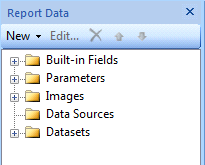 |
| SSRS: Report Data Section |
Expand the "Parameters" node in the tree view;
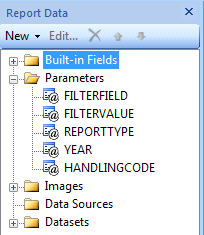 |
| SSRS: Expanded Parameters Node for Report Data |
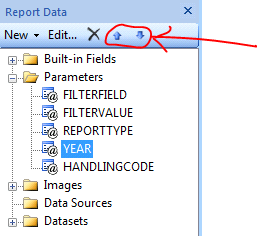 |
| SSRS: Highlighting Up/Down Buttons for Parameters |
Thursday, October 13, 2011
Oracle EBS: Initialising the APPS Environment in PL/SQL
How to set your user, responsibility, etc in PL/SQL to work with APPS functions
This blog post covers a fairly simple PL/SQL block that allows you to initialise your APPS environment from within PL/SQL allowing you to do things like run concurrent requests.
To alter your session in PL/SQL you need to use EXECUTE IMMEDIATE;
execute immediate 'alter session set NLS_LANGUAGE = AMERICAN';
execute immediate 'alter session set NLS_TERRITORY = AMERICA';
If you want to see what your current settings are you can query FND_GLOBAL.NLS_LANGUAGE - in our case this turned out to either be GB or null.
USER_ID - The ID of the user (from FND_USER)
RESP_ID - The ID of the responsibility (from FND_RESPONSIBILITY)
RESP_APPL_ID - The ID of the application (also from FND_RESPONSIBILITY, APPLICATION_ID column)
SECURITY_GROUP_ID - This has a default value and in most cases you won't need to change it
SERVER_ID - Same with this
Once you have the correct values you can execute the call using the PL/SQL;
APPS.FND_GLOBAL.APPS_INITIALIZE(
user_id => v_UserId,
resp_id => v_RespId,
resp_appl_id => v_RespAppId);
If successful you can then query values in FND_GLOBAL.
NOTE: It's worth probably saying that you just need to Initialize the environment - it's quite possible if you have an environment initialised as a lowly user you would still be able to pro grammatically run System Administrator Concurrent Requests with it.
This blog post covers a fairly simple PL/SQL block that allows you to initialise your APPS environment from within PL/SQL allowing you to do things like run concurrent requests.
Language (NLS_LANGUAGE and NLS_TERRITORY)
The most important thing to start with is to make sure that your language and the current APPS configured languages and territory are the same in your session as they are on the server. You only need to do this step if you are looking onto a server configured with a different language. For example here in the UK our server is configured as AMERICAN.To alter your session in PL/SQL you need to use EXECUTE IMMEDIATE;
execute immediate 'alter session set NLS_LANGUAGE = AMERICAN';
execute immediate 'alter session set NLS_TERRITORY = AMERICA';
If you want to see what your current settings are you can query FND_GLOBAL.NLS_LANGUAGE - in our case this turned out to either be GB or null.
Initialising Oracle EBS Environment
Clearly this issue has been around for a long time as Oracle provide a handy API in order to setup the environment. This API is part of the FND_GLOBAL package and is called APPS_INITIALIZE (note the US spelling). This API takes the following parameters;USER_ID - The ID of the user (from FND_USER)
RESP_ID - The ID of the responsibility (from FND_RESPONSIBILITY)
RESP_APPL_ID - The ID of the application (also from FND_RESPONSIBILITY, APPLICATION_ID column)
SECURITY_GROUP_ID - This has a default value and in most cases you won't need to change it
SERVER_ID - Same with this
Once you have the correct values you can execute the call using the PL/SQL;
APPS.FND_GLOBAL.APPS_INITIALIZE(
user_id => v_UserId,
resp_id => v_RespId,
resp_appl_id => v_RespAppId);
If successful you can then query values in FND_GLOBAL.
NOTE: It's worth probably saying that you just need to Initialize the environment - it's quite possible if you have an environment initialised as a lowly user you would still be able to pro grammatically run System Administrator Concurrent Requests with it.
Noetix: Manually Enabling Incremental Refresh in PL/SQL
Turning on Incremental Refreshing of Key Flex Field (KFF) data in Noetix.
This blog post covers turning on the Incremental Refresh "manually". Noetix provide a Concurrent Request that you can run what will work in almost all circumstances - unfortunately our site was one where it wouldn't run due to a independent value set that should have had some values in being empty.
NOTE: You *must* have initialised the APPS environment (calling APPS.FND_GLOBAL.APPS_INITIALIZE) in order for this to work. See Initialising the APPS Environment for my blog post giving instructions on how to do this in PL/SQL.
Executing the following SQL with turn on the incremental refresh;
declare
v_error_buf varchar2(2048);
v_Return_code number;
begin
noetix_sys.n_gseg_utility_pkg.enbl_incr(o_error_buf => v_error_buf,
o_return_code => v_return_code,
i_flex_code => 'ALL');
end;
This code needs to be run as the APPS user (after ensuring that this user is GRANTed permission to EXECUTE the n_gseq_utility_pkg package).
To check incremental refresh has been successfully enabled (there is absolutely no output from this call - very poor!) you need to query the triggers on the APPS tables that populate the KFF data and check to see if the triggers are enabled or not.
You can also log into Oracle e-Business Suite as the XXNAO user and check to see if the concurrent requests have run.
If the triggers have been enabled then you're in business - otherwise you'll need to, in the first instance, check the logs of the concurrent requests it schedules and if this doesn't work you'll then need to open the package in an editor and add DBMS_OUTPUT lines to echo the output to the screen so you can properly see what is going on.
This blog post covers turning on the Incremental Refresh "manually". Noetix provide a Concurrent Request that you can run what will work in almost all circumstances - unfortunately our site was one where it wouldn't run due to a independent value set that should have had some values in being empty.
NOTE: You *must* have initialised the APPS environment (calling APPS.FND_GLOBAL.APPS_INITIALIZE) in order for this to work. See Initialising the APPS Environment for my blog post giving instructions on how to do this in PL/SQL.
Executing the following SQL with turn on the incremental refresh;
declare
v_error_buf varchar2(2048);
v_Return_code number;
begin
noetix_sys.n_gseg_utility_pkg.enbl_incr(o_error_buf => v_error_buf,
o_return_code => v_return_code,
i_flex_code => 'ALL');
end;
This code needs to be run as the APPS user (after ensuring that this user is GRANTed permission to EXECUTE the n_gseq_utility_pkg package).
To check incremental refresh has been successfully enabled (there is absolutely no output from this call - very poor!) you need to query the triggers on the APPS tables that populate the KFF data and check to see if the triggers are enabled or not.
You can also log into Oracle e-Business Suite as the XXNAO user and check to see if the concurrent requests have run.
If the triggers have been enabled then you're in business - otherwise you'll need to, in the first instance, check the logs of the concurrent requests it schedules and if this doesn't work you'll then need to open the package in an editor and add DBMS_OUTPUT lines to echo the output to the screen so you can properly see what is going on.
Oracle PL/SQL: Storing Application Settings With Oracle
You're always being told not to hard-code values into your code (and they're right BTW). This blog post gives instructions on creating a table/ package combination in order to allow settings to be saved/ loaded from within PL/SQL.
The first step is to create a table to store the values;
create table XXC_SYSTEMSETTINGS
(
setting_section VARCHAR2(80) not null,
setting_name VARCHAR2(80) not null,
setting_value VARCHAR2(240) not null,
setting_type VARCHAR2(8) not null
);
alter table XXC_SYSTEMSETTINGS
add constraint XXC_SYSTEMSETTINGS_PK primary key (SETTING_SECTION, SETTING_NAME)
using index;
Now we've created a table an a primary key index so we can quickly search and find values. Now the next step we need to do is think about what values we actually want to be able to store.
The settings will need to be placed into the table so that they can be picked up by the package below. This is intended to be a very simple package allowing developers to create their own settings in the table but, by not having a non-developer user interface, preventing anyone else from having a go.
From my experience most settings are either numbers or text (and of course with text you can store anything else) so based on that I'm going to create a package for retrieving numbers and text - it would be easy to add another (for example a date) or to add a customisation to refine text to be something specific like a Zip Code. The package body therefore is;
CREATE OR REPLACE PACKAGE XXC_SYSTEMSETTING IS
function getNumber(p_Section in varchar2,
p_Name in varchar2,
p_Default in number) return number;
function getText(p_Section in varchar2,
p_Name in varchar2,
p_Default in varchar2) return varchar2;
function textSettingExists(p_Section in varchar2, p_Name in varchar2)
return boolean;
function numberSettingExists(p_Section in varchar2, p_Name in varchar2)
return boolean;
end XXC_SYSTEMSETTING;
Nothing earth-shattering, I've added the two "Exists" functions as it's often useful to know if the value already exists. The package body will be;
CREATE OR REPLACE PACKAGE BODY XXC_SYSTEMSETTING is
cursor c_Sys(p_Section varchar2, p_Name varchar2, p_Type varchar2) is
select sp.setting_value
from XXC_SYSTEMSETTINGS sp
where upper(sp.setting_section) = upper(p_Section)
and upper(sp.setting_name) = upper(p_Name)
and upper(sp.setting_type) = upper(p_Type);
function TextExists(p_Section in varchar2, p_Name in varchar2)
return boolean as
begin
return(getText(p_Section, p_Name, '@@@@') <> '@@@@');
end TextExists;
function NumberExists(p_Section in varchar2, p_Name in varchar2)
return boolean as
begin
return(getNumber(p_Section, p_Name, -905040) <> -905040);
end NumberExists;
function get(p_Section in varchar2,
p_Name in varchar2,
p_Type in varchar2,
p_Default in varchar2) return varchar2 as
pragma autonomous_transaction;
v_Result varchar2(255);
begin
open c_Sys(p_Section, p_Name, p_Type);
fetch c_Sys
into v_Result;
close c_Sys;
if v_Result is null then
v_Result := p_Default;
end if;
return v_Result;
end get;
function getNumber(p_Section in varchar2,
p_Name in varchar2,
p_Default in number) return number as
v_TextResult varchar2(255);
v_Result number;
begin
v_TextResult := get(p_Section, p_Name, 'NUMBER', to_char(p_Default));
begin
v_Result := to_number(v_TextResult);
exception
when others then
v_Result := p_Default;
end;
return v_Result;
end getNumber;
function getText(p_Section in varchar2,
p_Name in varchar2,
p_Default in varchar2) return varchar2 as
begin
return get(p_Section, p_Name, 'TEXT', p_Default);
end getText;
end XXC_SYSTEMSETTING;
The getNumber function gives an example of how it works when we have specific formatting you want to apply to a setting.
Hopefully this will help you, it's actually saved me a lot of time over the years!
The first step is to create a table to store the values;
create table XXC_SYSTEMSETTINGS
(
setting_section VARCHAR2(80) not null,
setting_name VARCHAR2(80) not null,
setting_value VARCHAR2(240) not null,
setting_type VARCHAR2(8) not null
);
alter table XXC_SYSTEMSETTINGS
add constraint XXC_SYSTEMSETTINGS_PK primary key (SETTING_SECTION, SETTING_NAME)
using index;
Now we've created a table an a primary key index so we can quickly search and find values. Now the next step we need to do is think about what values we actually want to be able to store.
The settings will need to be placed into the table so that they can be picked up by the package below. This is intended to be a very simple package allowing developers to create their own settings in the table but, by not having a non-developer user interface, preventing anyone else from having a go.
From my experience most settings are either numbers or text (and of course with text you can store anything else) so based on that I'm going to create a package for retrieving numbers and text - it would be easy to add another (for example a date) or to add a customisation to refine text to be something specific like a Zip Code. The package body therefore is;
CREATE OR REPLACE PACKAGE XXC_SYSTEMSETTING IS
function getNumber(p_Section in varchar2,
p_Name in varchar2,
p_Default in number) return number;
function getText(p_Section in varchar2,
p_Name in varchar2,
p_Default in varchar2) return varchar2;
function textSettingExists(p_Section in varchar2, p_Name in varchar2)
return boolean;
function numberSettingExists(p_Section in varchar2, p_Name in varchar2)
return boolean;
end XXC_SYSTEMSETTING;
Nothing earth-shattering, I've added the two "Exists" functions as it's often useful to know if the value already exists. The package body will be;
CREATE OR REPLACE PACKAGE BODY XXC_SYSTEMSETTING is
cursor c_Sys(p_Section varchar2, p_Name varchar2, p_Type varchar2) is
select sp.setting_value
from XXC_SYSTEMSETTINGS sp
where upper(sp.setting_section) = upper(p_Section)
and upper(sp.setting_name) = upper(p_Name)
and upper(sp.setting_type) = upper(p_Type);
function TextExists(p_Section in varchar2, p_Name in varchar2)
return boolean as
begin
return(getText(p_Section, p_Name, '@@@@') <> '@@@@');
end TextExists;
function NumberExists(p_Section in varchar2, p_Name in varchar2)
return boolean as
begin
return(getNumber(p_Section, p_Name, -905040) <> -905040);
end NumberExists;
function get(p_Section in varchar2,
p_Name in varchar2,
p_Type in varchar2,
p_Default in varchar2) return varchar2 as
pragma autonomous_transaction;
v_Result varchar2(255);
begin
open c_Sys(p_Section, p_Name, p_Type);
fetch c_Sys
into v_Result;
close c_Sys;
if v_Result is null then
v_Result := p_Default;
end if;
return v_Result;
end get;
function getNumber(p_Section in varchar2,
p_Name in varchar2,
p_Default in number) return number as
v_TextResult varchar2(255);
v_Result number;
begin
v_TextResult := get(p_Section, p_Name, 'NUMBER', to_char(p_Default));
begin
v_Result := to_number(v_TextResult);
exception
when others then
v_Result := p_Default;
end;
return v_Result;
end getNumber;
function getText(p_Section in varchar2,
p_Name in varchar2,
p_Default in varchar2) return varchar2 as
begin
return get(p_Section, p_Name, 'TEXT', p_Default);
end getText;
end XXC_SYSTEMSETTING;
The getNumber function gives an example of how it works when we have specific formatting you want to apply to a setting.
Hopefully this will help you, it's actually saved me a lot of time over the years!
Thursday, October 6, 2011
SSRS: Using TS&R To Fix Report Builder 3 Issue with SharePoint Integrated Mode
This blog post describes a remedy for the issue which prevents Report Builder 3 from working with a Report in SharePoint integrated mode that has been migrated to SharePoint from a different server.
At the moment Microsoft has no solution for this issue (other that "don't use Report Builder 3).
NOTE: The exact problem that this blog post is showing you how to fix is detailed in another post here.
Background/ Setup
The first step in fixing this problem is gathering all the information. Each of your Reports will have embedded into it both the previous server URL and the location it was using on that server for it's Data Set. In this example we will assume the following;
The original server used the structure;
With the root folder being treated as "live" and the DEV and TST folders being hidden. The only location for data sets is in the "Shared Datasets" folders (highlighted in green).
This gives us the following list of "possible" sources for Data sets;
Each of these will need to be mapped to the "new" folder on the SharePoint integrated mode server. For the purposes of this example (and to assume maximum change) I'm going to assume the structure of the new server is;
Assuming you're following Microsoft "guidance" (using properties rather than folders) it's quite possible you could end up with something like this.
One other difference between non-integrated mode and integrated mode is that the Data Sets now have .rsd as a suffix (which makes sense - but is annoying).
An the final difference is in the server name itself (well assuming you did a migration rather than an upgrade to the server!). In our example I'm going to assume the SharePoint server is called "ssrsintegrated" and the other server is called "ssrs".
And that's it - a complete list of all the changes we need to make.
Configuring The Application
The first step is to download and open the application (it's open-source and you can find the details of how to get hold of it on another blog post TS&R: Replacing Text in Multiple Files).
The Search Folder needs to be set to point to the SharePoint servers' published folder for the "Reports "document library;
\\ssrsintegrated\DavWWWRoot\Reports\
The File Extensions we are interested in need to be restricted to SSRS Reports;
|*.rdl|
The vertical lines either side will be added when you enter "*.rdl" into the entry box;
Next is the Replace Strings entry box. Copy/Paste the following lines;
/DEV/Finance/Shared Datasets/|/Data Sets/
/DEV/Production/Shared Datasets/|/Data Sets/
/DEV/Order 2 Cash/Shared Datasets/|/Data Sets/
/TST/Finance/Shared Datasets/|/Data Sets/
/TST/Production/Shared Datasets/|/Data Sets/
/TST/Order 2 Cash/Shared Datasets/|/Data Sets/
/Finance/Shared Datasets/|/Data Sets/
/Production/Shared Datasets/|/Data Sets/
/Order 2 Cash/Shared Datasets/|/Data Sets/
http://ssrs/ReportServer|http://ssrsintegrated
http://ssrs/reportserver|http://ssrsintegrated
|.rsd
.rsd.rsd|.rsd
NOTE: The first 9 lines are just mapping old data set directories to the new one, the next two lines map the old URL's to the new one (you'll need to add additional lines if your developers capitalisation is not consistent - thankfully ours just settled on two versions!), the next line adds the .rsd to the Data Set reference and the final line removes duplicates if it was already there!
Finally an Output Folder needs to be selected (i.e. C:\TEMP\Report Output\).
Click "Execute" and the changes will be made and updated files will be placed in the C:\TEMP\Report Output\ directory - reports which are not changed will not be included in the new directory (so you could repeatedly run this process as you migrate new reports and only change the new reports).
Summary
Not the easiest method I know but at least it works and if you have 2/300 files it's a lot quicker than manual updates. It's completely ludicrous that Microsoft haven't patched this problem - it does make "Report Builder 3" a completely useless product in some specific circumstances and "just use BIDS" is not really acceptable unless they're going to scrap Report Builder 3!
At the moment Microsoft has no solution for this issue (other that "don't use Report Builder 3).
NOTE: The exact problem that this blog post is showing you how to fix is detailed in another post here.
Background/ Setup
The first step in fixing this problem is gathering all the information. Each of your Reports will have embedded into it both the previous server URL and the location it was using on that server for it's Data Set. In this example we will assume the following;
The original server used the structure;
 |
| SSRS: Non-Sharepoint Integrated Mode Folder Structure |
This gives us the following list of "possible" sources for Data sets;
- /DEV/Order 2 Cash/Shared Datasets
- /DEV/Production/Shared Datasets
- /DEV/Finance/Shared Datasets
- /TST/Order 2 Cash/Shared Datasets
- /TST/Production/Shared Datasets
- /TST/Finance/Shared Datasets
- /Order 2 Cash/Shared Datasets
- /Production/Shared Datasets
- /Finance/Shared Datasets
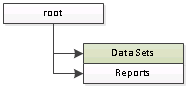 |
| SharePoint Integrated Mode Structure |
Assuming you're following Microsoft "guidance" (using properties rather than folders) it's quite possible you could end up with something like this.
One other difference between non-integrated mode and integrated mode is that the Data Sets now have .rsd as a suffix (which makes sense - but is annoying).
An the final difference is in the server name itself (well assuming you did a migration rather than an upgrade to the server!). In our example I'm going to assume the SharePoint server is called "ssrsintegrated" and the other server is called "ssrs".
And that's it - a complete list of all the changes we need to make.
Configuring The Application
The first step is to download and open the application (it's open-source and you can find the details of how to get hold of it on another blog post TS&R: Replacing Text in Multiple Files).
The Search Folder needs to be set to point to the SharePoint servers' published folder for the "Reports "document library;
\\ssrsintegrated\DavWWWRoot\Reports\
The File Extensions we are interested in need to be restricted to SSRS Reports;
|*.rdl|
The vertical lines either side will be added when you enter "*.rdl" into the entry box;
Next is the Replace Strings entry box. Copy/Paste the following lines;
/DEV/Finance/Shared Datasets/|/Data Sets/
/DEV/Production/Shared Datasets/|/Data Sets/
/DEV/Order 2 Cash/Shared Datasets/|/Data Sets/
/TST/Finance/Shared Datasets/|/Data Sets/
/TST/Production/Shared Datasets/|/Data Sets/
/TST/Order 2 Cash/Shared Datasets/|/Data Sets/
/Finance/Shared Datasets/|/Data Sets/
/Production/Shared Datasets/|/Data Sets/
/Order 2 Cash/Shared Datasets/|/Data Sets/
http://ssrs/ReportServer|http://ssrsintegrated
http://ssrs/reportserver|http://ssrsintegrated
|.rsd
.rsd.rsd|.rsd
NOTE: The first 9 lines are just mapping old data set directories to the new one, the next two lines map the old URL's to the new one (you'll need to add additional lines if your developers capitalisation is not consistent - thankfully ours just settled on two versions!), the next line adds the .rsd to the Data Set reference and the final line removes duplicates if it was already there!
Finally an Output Folder needs to be selected (i.e. C:\TEMP\Report Output\).
Click "Execute" and the changes will be made and updated files will be placed in the C:\TEMP\Report Output\ directory - reports which are not changed will not be included in the new directory (so you could repeatedly run this process as you migrate new reports and only change the new reports).
Summary
Not the easiest method I know but at least it works and if you have 2/300 files it's a lot quicker than manual updates. It's completely ludicrous that Microsoft haven't patched this problem - it does make "Report Builder 3" a completely useless product in some specific circumstances and "just use BIDS" is not really acceptable unless they're going to scrap Report Builder 3!
Subscribe to:
Posts (Atom)