Pages

Showing posts with label Oracle Process Manufacturing. Show all posts

Tuesday, April 16, 2013

Lot Genealogy, Part 3: Debugging Lots and Batches

As you might have noticed I've just updated the LOT_GENEALOGY source code for this project to a new version following the discovery of a bug where the product of a batch is two different item numbers. This is a rare occurrence in our system, which is why it went undetected for so long, but it might not be in yours.

Rather than dwell on that I thought I'd talk about exactly what the process was that led to us discovering the fixing the error.

The first report came from the users; a lot which they knew had two item numbers was only showing one. Other lots didn't seem to be affected. This was then traced back to a single batch, 73591, running this SQL gave us the transactions that affected the cache for that batch. To publish this data I'm obfuscating the data (see here);

SELECT LGG.TRANSACTION_ID,
       HIDEDATA.Hide('LGG.LN', LGG.LOT_NUMBER) Lot_Number,
       LGG.TRANSACTION_QUANTITY,
       LGG.TRANSACTION_TYPE_NAME,
       LGG.Item_Number,
       HIDEDATA.Hide('LGG.ID', LGG.Item_Description) Item_Description,
       LGG.ITEM_TYPE
  FROM LOT_GENEALOGY_GETTRANSACTIONS LGG
 WHERE 1 = 1
   AND LGG.Batch_No = '73591';

The result of this is the following transactions;

LG Transactions For A Single Batch
As you can see the first thing we have is three "WIP Completion" transactions. Each of these represents the completion of the batch and the generation of an output. In this case Item Numbers 073081 and 07440. However without knowing what information was put *into* the batch in the first place it's not possible to usefully use this information in the Genealogy - It has to wait until the "WIP Issue" transactions are processed (each of which represents an ingredient).

The next stage for debugging the cache was to (on a test system!) change the LOT_GENEALOGY_GETTRANSACTIONS view so that rather than looking at *everything* it only looks at the records for a single batch - this is simply done by adding the following where clause to the view SQL;

-- Restrict transactions to a single batch (for debugging)
AND GBH.Batch_No = '73591'

Now we're restricted the input records to just those affecting that batch we can just re-build the whole cache - it will take longer to do the delete than the insert. The script to do it is;

begin
  -- Call the procedure
  lot_genealogy.refreshwholecache;
end;


Once that has been completed the entire content of the cache is the single batch we're tracking. The SQL to show it is;

SELECT HIDEDATA.Hide('LGG.LN', LGW.Master_Lot_Number) Master_Lot_Number,
       HIDEDATA.Hide('LGG.LN', LGW.Ingred_Lot_Number) Ingred_Lot_Number,
       LGW.Ingred_Item_Number,
       HIDEDATA.Hide('LGG.ID', LGW.Ingred_Item_Description) Ingred_Item_Description,
       LGW.Ingred_Item_Type_Code,
       LGW.Batch_Number,
       HIDEDATA.Hide('LGG.LN', LGW.PRODUCT_LOT_NUMBER) PRODUCT_LOT_NUMBER,
       LGW.PRODUCT_ITEM_NUMBER,
       HIDEDATA.Hide('LGG.ID', LGW.Product_Item_Description) Product_Item_Description,
       LGW.Product_Item_Type_Code
  FROM LOT_GENEALOGY_WHEREUSED LGW
 WHERE 1 = 1


The result of this is;

Lot Genealogy Cache: Result for a Single Batch
As you can see the only product for Ingredient Lot LGG.LN 37 is item number 073002, if we look at the transactions earlier we can see that it should be reporting Item Number 07440 as well - it's not which means something is going wrong in the "WIP Issue" part of the cache processing.

If we look at the source code (available here - via Google Drive) you'll see that the final part of the WIP Issue is creating the records in LOT_GENEALOGY_BATCH_PRODUCT so the next stage to check is to see if these records are being created correctly. Here is the SQL;

SELECT LGBP.batch_number,
       HIDEDATA.Hide('LGG.LN', LGBP.PRODUCT_LOT_NUMBER) PRODUCT_LOT_NUMBER,
       LGBP.product_item_number,
       HIDEDATA.Hide('LGG.ID', LGBP.Product_Item_Description) Product_Item_Description,
       LGBP.product_item_type_code
  FROM LOT_GENEALOGY_BATCH_PRODUCT LGBP
 WHERE 1 = 1
   AND LGBP.Batch_Number = '73591'


This gives us the result;

Lot Genealogy Batch Products
This shows us that the correct batch products are being recorded - this is important as we now have both ends of the transaction; the correct transactions are going in and the correct products are coming out. However we also know that the cache isn't being updated correctly therefore the culprits must be the two pieces of SQL that are actually doing the inserts.

If you look at the first one;

INSERT INTO NOETIX_SYS.Lot_Genealogy_WhereUsed
    SELECT v_Transaction.Lot_Number, -- Master_Lot_Number
           v_Transaction.Lot_Number, -- Ingred_Lot_Number
           v_Transaction.Item$item, -- INGRED_ITEM$ITEM
           v_Transaction.Item_Description, -- INGRED_ITEM_DESCRIPTION
           v_Transaction.Item_Type_Code, -- INGRED_ITEM_TYPE_CODE
           v_Transaction.Batch_Number, -- Batch_Number
           v_Product.Product_Lot_Number, -- Product_Lot_Number
           v_Product.PRODUCT_ITEM$ITEM, -- PRODUCT_ITEM$ITEM
           v_Product.PRODUCT_ITEM_DESCRIPTION, -- PRODUCT_ITEM_DESCRIPTION
           v_Product.PRODUCT_ITEM_TYPE_CODE -- PRODUCT_ITEM_TYPE_CODE
      FROM DUAL
     WHERE NOT EXISTS
     (SELECT 1
              FROM NOETIX_SYS.Lot_Genealogy_WhereUsed LGI
             WHERE LGI.MASTER_LOT_NUMBER = v_Transaction.Lot_Number
               AND LGI.Ingred_LOT_NUMBER = v_Transaction.Lot_Number
               AND LGI.Batch_Number = v_Transaction.Batch_Number
               AND (v_Product.Product_Lot_Number IS NULL AND
                   LGI.PRODUCT_LOT_NUMBER IS NULL OR
                   v_Product.Product_Lot_Number = LGI.PRODUCT_LOT_NUMBER));


You can see that this is actually just a select from DUAL so the fact that it's only working on the first pass (i.e. for the first product) means that the offending part of the code must be the NOT EXISTS.

Looking at the WHERE clause in the sub-select reveals that it's not using the Product_Item_Number field. Not using this field means that after it's inserted the first product it mistakes the second one for a duplicate and skips over it.

Altering the final AND statement to;

AND (v_Product.Product_Lot_Number IS NULL AND LGI.PRODUCT_LOT_NUMBER IS NULL OR (v_Product.Product_Lot_Number = LGI.PRODUCT_LOT_NUMBER AND v_Product.Product_Item_Number = LGI.PRODUCT_ITEM_NUMBER))

For BOTH pieces of SQL (the one updating  all the existing records as well as this one which is creating a new master record) addresses the issue logically, if you rebuild the cache from scratch (using the script above) and re-run the SQL to get the content of the cache you will now see;

Lot Genealogy Cache - Complete
The first thing you notice is there are a lot more records. The new records are for Item Number 07440 which is the one we were missing earlier.

If you do a source comparison between the new and old versions of the package you'll notice that this wasn't the only change I made - I've added a great deal more logging to the WIP Issue transaction so it's possible to see what is going on and what "SQL%ROWCOUNT = 0" actually means! I also added a warning to WIP Completion if no records are updated.

I hope this is of some interest ... Debugging an application, even one you've written yourself, is a skill that's very difficult to transfer. Hopefully there is enough information here for people to at least make a start for future issues (which will, by their very nature, be completely different I'm sure!).

Tuesday, April 9, 2013

Lot Genealogy (Part 2): Automating Testing of a Genealogy

If you are going to roll out any caching of your lot genealogy data the one clear thing you have to get right is testing. If, like us, you are working in a highly regulated environment it's necessary to ensure that you've got your testing right.

To this end I've created a new table called LOT_GENEALOGY_WHEREUSED_TESTS;

Lot_Genealogy_WhereUsed_Tests Table Description
The purpose of this new table is to hold copies of the lot genealogy data from Lot_Genealogy_WhereUsed. By holding these "snapshots" we can check after each rebuild of the cache that the data that was there and we had previously validated as correct is still there.

To create tests the following SQL will insert an existing Lot Genealogy into the testing table;

INSERT INTO LOT_GENEALOGY_WHEREUSED_TESTS
  SELECT 'ATR002', -- test_Ref
         'Product lot (166449) consists of two items (038003 and 038001)', -- test_description
         -- data from Lot Genealogy
         MASTER_LOT_NUMBER,
         INGRED_LOT_NUMBER,
         INGRED_ITEM_NUMBER,
         INGRED_ITEM_DESCRIPTION,
         INGRED_ITEM_TYPE_CODE,
         BATCH_NUMBER,
         PRODUCT_LOT_NUMBER,
         PRODUCT_ITEM_NUMBER,
         PRODUCT_ITEM_DESCRIPTION,
         PRODUCT_ITEM_TYPE_CODE
    FROM LOT_GENEALOGY_WHEREUSED LGW
   WHERE 1 = 1
     AND LGW.MASTER_LOT_NUMBER = '0490/0002';


This SQL is taking the lot genealogy for Master Lot Number 0490/0002 and copying it into the testing table, adding a test reference (ATR002) and a test description so we know what the test is supposed to be checking for.

That, as they say, was the easy bit. Now we need to create some SQL that is capable of running a test and returning a result. Our reporting tool (in case you can't tell from my other blog posts!) is SQL Server Reporting Services (SSRS) hence I'm going to split the SQL into two pieces, one to give me a list of all the tests and the other to run an individual test - SSRS will allow me to embed the latter as a sub-report into a report driven by the former.

List of Tests SQL

This was by far the easiest of the two;

SELECT DISTINCT LGWT.TEST_REF VALUE,
                LGWT.Test_Ref || ' (Lot ' || LGWT.MASTER_LOT_NUMBER || ')' LABEL
  FROM LOT_GENEALOGY_WHEREUSED_TESTS LGWT
 ORDER BY 1, 2


This returns something similar to;

List of Tests Generated Using SQL
I've added the bit of additional detail (for the Label) just so that in addition for being able to use this in the main report to get a list of tests I can also use it in the sub-report as a source for a picker on the "Test_Ref" parameter.

Run A Test SQL

This is slightly larger but here's the code then I'll try and explain it;

SELECT :Test_Ref "Test Ref",
       (SELECT TEST_DESCRIPTION
          FROM LOT_GENEALOGY_WHEREUSED_TESTS LGWT1
         WHERE LGWT1.TEST_REF = :Test_Ref
           AND ROWNUM = 1) "Test Description",
       TR.Test_Row_Count "Test Row Count",
       TR.Cache_Row_Count "Cache Row Count",
       TR.Union_Row_Count "Union Row Count",
       CASE
         WHEN TR.Test_Row_Count = TR.Cache_Row_Count AND
              TR.Cache_Row_Count = TR.Union_Row_Count THEN
          'PASS'
         ELSE
          'FAIL'
       END "Test Result"
  FROM (SELECT (SELECT COUNT(*)
                  FROM LOT_GENEALOGY_WHEREUSED_TESTS LGWT1
                 WHERE LGWT1.TEST_REF = :Test_Ref) Test_Row_Count,
               (SELECT COUNT(*)
                  FROM LOT_GENEALOGY_WHEREUSED LGW
                 WHERE LGW.MASTER_LOT_NUMBER =
                       (SELECT MASTER_LOT_NUMBER
                          FROM LOT_GENEALOGY_WHEREUSED_TESTS
                         WHERE TEST_REF = :Test_Ref
                           AND ROWNUM = 1)) Cache_Row_Count,
               (SELECT COUNT(*)
                  FROM (SELECT MASTER_LOT_NUMBER,
                               INGRED_LOT_NUMBER,
                               INGRED_ITEM_NUMBER,
                               INGRED_ITEM_DESCRIPTION,
                               INGRED_ITEM_TYPE_CODE,
                               BATCH_NUMBER,
                               PRODUCT_LOT_NUMBER,
                               PRODUCT_ITEM_NUMBER,
                               PRODUCT_ITEM_DESCRIPTION,
                               PRODUCT_ITEM_TYPE_CODE
                          FROM LOT_GENEALOGY_WHEREUSED_TESTS LGWT1
                         WHERE LGWT1.TEST_REF = :Test_Ref
                        UNION
                        SELECT MASTER_LOT_NUMBER,
                               INGRED_LOT_NUMBER,
                               INGRED_ITEM_NUMBER,
                               INGRED_ITEM_DESCRIPTION,
                               INGRED_ITEM_TYPE_CODE,
                               BATCH_NUMBER,
                               PRODUCT_LOT_NUMBER,
                               PRODUCT_ITEM_NUMBER,
                               PRODUCT_ITEM_DESCRIPTION,
                               PRODUCT_ITEM_TYPE_CODE
                          FROM LOT_GENEALOGY_WHEREUSED LGW
                         WHERE LGW.MASTER_LOT_NUMBER =
                               (SELECT MASTER_LOT_NUMBER
                                  FROM LOT_GENEALOGY_WHEREUSED_TESTS
                                 WHERE TEST_REF = :Test_Ref
                                   AND ROWNUM = 1))) Union_Row_Count
          FROM DUAL) TR


As you can see it takes a single parameter, the Test Reference Number. How it works is it counts the number of records in the cache, counts the number of records in the test table, and then does a select of all the records in the test table and, using a straight UNION, all the records in the cache. Because of the way UNIONs work (stripping out duplicates) the COUNT of the number of records returned by the UNION should be the same as the number of records in each of the other two queries. If they are all the same the TEST_RESULT is 'PASS' otherwise it's 'FAIL'.

NOTE: I'm sure this could be done a lot more efficiently but to be honest given the relative sizes of the tables I don't think you'll be sitting round too long for a result. On our system it takes less then .02 of a second. Your mileage will vary, but probably not by much!

Now that I've got the SQL I've setup a simple SSRS report to display the result for a single test back to me;

SSRS Report Showing A Single Test Result
You'll also notice that the test result includes a listing of all the records included in the test. This is a simple SELECT * ... WHERE TEST_REF = ... so I'm not going to give you the SQL for it.

The master report looks like this (in Report Builder 3);

SSRS Master Reporting Showing All Tests
I've included text boxes (on each page as part of the footer) to record who the Tester and Checker are and the Date. For our internal quality purposes we need this level of detail, you might not but what's the harm?

When executed the report appears like this;

SSRS Testing Report - Final Result
Hopefully you will find this useful.

Friday, March 8, 2013

Lot Genealogy (Part 1): Building a Cache From R12 Data

UPDATE: 15-APR-2013 fixed a bug with WIP Issue transactions, added in some more logging (see source code).

If you have had any opportunities to work using Oracle Process Manufacturing one of features that Oracle have removed in R12 is reporting on Lot Genealogy, specifically the ability to look at the entire genealogy for a lot.

I've tackled this issue previously using Noetix (see here) and this is the first part of a series in which I'll attempt to provide a means for generating a cache for the lot genealogy information that you can report on (rather than having to build the genealogy at the time you run the report) without using Noetix.

So here's the plan;

Lot Genealogy Cache: Process Overview
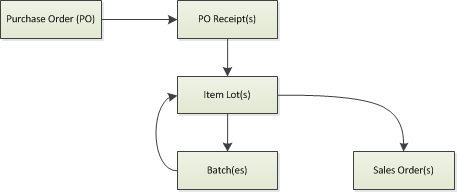
This plan is based on the established Lot and Batch cycle;

PO > Lot > Batch Cycle
It's the iterative nature of lots > batches and batches > lots that causes a lot of problems when you're writing reports. The key things the process above includes that the simplified diagram doesn't is the ability to reverse a the creation of batches from a lot and the consumption of batches into lots.

Looking at the process overview the first part we need to worry about is the second box down (Get Next Transaction Data). What we need to do in this process is get a sequential list of all transactions since the last time we ran the process. The SQL below will do this;

SELECT MMT.TRANSACTION_ID,
       GBH.Batch_No,
       MTLN.LOT_NUMBER,
       MTLN.TRANSACTION_QUANTITY,
       MTT.TRANSACTION_TYPE_NAME,
       MSIB.SEGMENT1             Item_Number,
       MSIT.DESCRIPTION          Item_Description,
       MSIB.ITEM_TYPE            Item_Type
  FROM INV.MTL_TRANSACTION_LOT_NUMBERS MTLN,
       INV.MTL_MATERIAL_TRANSACTIONS   MMT,
       INV.MTL_SYSTEM_ITEMS_B          MSIB,
       INV.MTL_SYSTEM_ITEMS_TL         MSIT,
       INV.MTL_LOT_NUMBERS             MLN, -- Used to identify lots that have been disabled
       GME.GME_BATCH_HEADER            GBH,
       INV.MTL_TRANSACTION_TYPES       MTT
 WHERE 1 = 1
   AND MTLN.TRANSACTION_ID = MMT.TRANSACTION_ID
   AND MTLN.INVENTORY_ITEM_ID = MMT.INVENTORY_ITEM_ID
   AND MTLN.ORGANIZATION_ID = MMT.ORGANIZATION_ID
   AND MTLN.TRANSACTION_SOURCE_TYPE_ID = 5 /* Job Or Schedule */
   AND MMT.INVENTORY_ITEM_ID = MSIB.INVENTORY_ITEM_ID
   AND MMT.Organization_Id = MSIB.Organization_Id
   AND MSIT.INVENTORY_ITEM_ID(+) = MSIB.INVENTORY_ITEM_ID
   AND MSIT.ORGANIZATION_ID(+) = MSIB.ORGANIZATION_ID
   AND MMT.Transaction_Source_ID = GBH.Batch_Id(+)
   AND MMT.TRANSACTION_TYPE_ID = MTT.TRANSACTION_TYPE_ID(+)
   AND MTLN.Lot_Number = MLN.Lot_Number
   AND MTLN.Inventory_Item_Id = MLN.Inventory_Item_Id
   AND MTLN.Organization_Id = MLN.Organization_Id
   AND MLN.Disable_Flag IS NULL;


Rather than embedding this into our process I think a good idea would be to create an external view (which I'm going to call LOT_GENEALOGY_GETTRANSACTIONS). The source code file for this is available here (via Google Drive).

The next thing we need to consider is how we're going to store the information in the cache itself. The following are source files for each required object;
Assuming you've built the view and the tables above the main package can then be built. The source is here.

Once that's been built you need to configure the settings table;

insert into LOT_GENEALOGY_SETTINGS (setting_name, value_number, value_text, value_date)
values ('MAX_TRANS_NO', -1, null, null);
insert into LOT_GENEALOGY_SETTINGS (setting_name, value_number, value_text, value_date)
values ('LOGGING', null, 'YES', null);
commit;

And then you can run the stored procedure;

begin
  -- Call the procedure
  lot_genealogy.refreshwholecache;
end;


That will populate the cache for the first time, you then need to schedule;

begin
  -- Call the procedure
  lot_genealogy.doupdate;
end;


Which will incrementally update the cache based on new transactions. We schedule this to run every 30 minutes but it will depend on your volume of transactions as to how often you want it to run!


Monday, July 30, 2012

Noetix: Working With Item Cost Summaries

If you are, like us, users of Oracle Process Manufacturing then you'll have written a lot of reports which rely on Item Costings (both for products and ingredients). One of the things that makes the current structure of the Noetix View difficult to work with is that it provides a detailed breakdown of the costs - something that's useful if you're reporting on the costs themselves - which is not useful if you're reporting on, for example, the value of inventory where you're just interested in the *total* cost.

Of course it's fairly easy to get there, you just total up all the costs but what it does do is introduce unnecessary complexity in your SQL often leading to sub-selects in JOINS like the following;

select 
  gic.ITEM$Item,
  sum(decode(gic.Component_Group, 'LAB', gic.Item_Cost)) as TOTAL_LABOUR_COST,
  sum(decode(gic.Component_Group, 'OVE', gic.Item_Cost)) as TOTAL_OVERHEAD_COST,
  sum(decode(gic.Component_Group, 'MAT', gic.Item_Cost)) as TOTAL_MATERIAL_COST
from gmfg0_item_costs gic
where gic.PERIOD_CODE = :PERIODCODE
group by gic.ITEM$Item

As you can see we have three component groups LABour, OVErhead, and MATerial and while this is a fairly understandable piece of SQL what happens is that it gets repeated over and over again in various reports and when, as recently, we change the way costing works (by moving costs from one Organsiation to anotehr) it becomes very complex to make the change to all the affected reports.

Because of this we've introduced a summary view which sits on top of GMFG0_Item_Costs called GMFG0_Item_Cost_Summary which looks like this;

Name                Type         Nullable Default Comments
------------------- ------------ -------- ------- --------
ORGANIZATION_CODE   VARCHAR2(40) Y                        
PERIOD_CODE         VARCHAR2(10)                          
Z$INVG0_ITEMS       ROWID        Y                        
ITEM$ITEM           VARCHAR2(40) Y                        
TOTAL_LABOUR_COST   NUMBER       Y                        
TOTAL_OVERHEAD_COST NUMBER       Y                        
TOTAL_MATERIAL_COST NUMBER       Y                        
TOTAL_ITEM_COST     NUMBER       Y  


The SQL to generate it is;

create or replace view gmfg0_item_cost_summary as
select gic.Organization_Code,
       gic.period_code,
       gic.Z$INVG0_Items,
       gic.ITEM$Item,
       sum(decode(gic.Component_Group, 'LAB', gic.Item_Cost)) as TOTAL_LABOUR_COST,
       sum(decode(gic.Component_Group, 'OVE', gic.Item_Cost)) as TOTAL_OVERHEAD_COST,
       sum(decode(gic.Component_Group, 'MAT', gic.Item_Cost)) as TOTAL_MATERIAL_COST,
       sum(gic.Item_Cost) as TOTAL_ITEM_COST
  from gmfg0_item_costs gic
 group by gic.Organization_Code,
          gic.period_code,
          gic.Z$INVG0_Items,
          gic.ITEM$Item;

To have this view rebuilt every time we do a Noetix regenerate we have created a XU6 script to automatically build the view after every regenerate - it's available here (via Google Docs).


Wednesday, April 25, 2012

Noetix: Release 11 to Release 12 Migration (Replacing Obsolete Views)

While migration to R12 with Noetix is very easy and relatively painless in some areas the significant changes in Inventory between the two versions make it practically impossible for Noetix views to handle the migration "invisibly" (as they tend to do in other areas like Account Payable).

This is especially true if your organisation, like mine, is taking this opportunity to do a bit of restructuring the system so that, for example, rather than using stock being in a particular warehouse to mean that it's a retained sample achieving the same thing using statuses and getting rid of the warehouse.

Here is a list of R11 and R12 Noetix View Templates with "suggested" replacements. It's not a complete list, but it is the list we have been working of for all our reports;

View Label >>>> Recommended Replacement
GMP_Forecast_Details >>>> INV_Forecasts
GMI_Unallocated_Inventory >>>> INV_Unallocated_Inventory view
GMI_Onhand_Inv_By_Lot  >>>> INV_Item_Onhand_By_Lot*
GMI_Onhand_Inv_By_Location  >>>> INV_Onhand_Quantities*
GMI_Month_End_Inventory  >>>> INV_Period_Close_Details*
GMI_Item_Master  >>>> INV_Items and INV_Item_Inventory_Attributes
GMI_Inv_Transactions  >>>> INV_Transactions or INV_Transaction_Details
GMF_Update_Subledger  >>>> GMF_SLA_Cost_Subledger
GMF_Cost_Warehouse_Assoc  >>>> GMF_Cost_Organization_Assc
GMF_Order_Details_Base  >>>> GMF_SLA_Cost_Subledger

*- The migration from R11 Process Manufacturing Inventory to R12 Common Inventory for us has been less than smooth and has not been helped by a few, dare I say it, "obvious" issues that Noetix should have addressed prior to us attempting the upgrade.

The most obvious issue was that in R12 there was no view that would tell us the lot number, the location, and the onhand quantity. The best we could do is two out of three. I just cannot imagine any organisation out there not wanting to see all three on the same report. This led to us having to make significant customisations in order for the migration path to actually be a migration path.

For example looking at the view template INV_Item_Onhand_By_Lot we have added the following customisation columns (with some additional information where appropriate);

Days_Since_First_Transaction
ITEM  (Table Alias= ITEM, Column expression=ITEM) << Flexfield
Item_Type  (Table Alias= ITEM, Column expression=ITEM_TYPE)
Item_Type_Code  (Table Alias= ITEM, Column expression=ITEM_TYPE)
LOCT  (Table Alias= LOCT, Column expression=LOCT) << Flexfield
Material_Status  (Table Alias= MMST, Column expression=DESCRIPTION)
Material_Status_Code  (Table Alias= MMST, Column expression=STATUS_CODE)
Organization_Code  (Table Alias= MPARM, Column expression=ORGANIZATION_CODE)


Here is our list of customisation to the GMI_Onhand_Inv_By_Lot view;
Batch_Id 
Company_Code  (Table Alias= XMAP, Column expression=COMPANY_CODE)
Company_Name  (Table Alias= XMAP, Column expression=COMPANY_NAME)
Days_Since_First_Transaction
Inventory_Class  (Table Alias= ITEM, Column expression=INV_CLASS)
Item_Cost_Class  (Table Alias= ITEM, Column expression=ITEMCOST_CLASS)
Item_Id  (Table Alias= ITEM, Column expression=Item_Id)
Lots_MFD_Flag  (Table Alias= LOTS, Column expression=DECODE(LOTS.DELETE_MARK,0,'N',1,'Y'))
Qc_Hold_Reason_Code  (Table Alias= LOINV, Column expression=QCHOLD_RES_CODE)


I've highlighted the location flexfield which if you look at the Noetix columns for the original view seems to directly map to the INVENTORY_LOCATION_CODE. There seems to be no mapping for this column down the migration path we were recommended to take.

I'm currently going through the process of sorting out our customisations (something that I'm sure will greatly relieve Noetix Support!) and I'll be publishing as much as I possibly can of the work we've done (including the difference between Lot Status and Material_Status which I'm sure will intrigue and worry people).

Tuesday, April 17, 2012

Noetix: Problems with INV_Reservations Template Missing Records

As we've just (at the beginning of the year) moved to R12 we've only just started exploiting the Reservations functionality and, as is often the case, when we started using the new functionality we wanted to report on it.

Noetix provides a view (descended from the INV_Reservations) template that seemed to meet most of our needs and we produced a few reports based on it. Yesterday one of our users reported an issue whereby only certain reservations were being included in the total reserved;

Item Reservations Window (Release 12)
 As you can see we have five Reservation amounts (1, 1, 2, 2, .25), now the total being reported by the Noetix view was 3.25 (actual total is 6.25).

After a bit of investigation it became clear that what the view was adding up the distinct values (1 + 2 + .25 = 3.25) and I'm sure you'll spot that the most likely reason behind this is the use of a UNION rather than a UNION ALL in the SQL.

Looking at the SQL behind the view it shows that both the INV_Reservations and the INV_Reservations_Base views have UNIONS and in order to fix the issue you need to replace them with UNION ALL's. This issue has been raised with Noetix and is bug 29598.

The script to fix it is;

UPDATE n_view_query_templates
   SET union_minus_intersection = 'UNION ALL',
       last_update_date = TO_DATE('17-APR-2012'),
       last_updated_by = 'B29598'
 WHERE view_label like 'INV_Reservations_Base'
   AND union_minus_intersection = 'UNION'
;

UPDATE n_view_query_templates
   SET union_minus_intersection = 'UNION ALL',
       last_update_date = TO_DATE('17-APR-2012'),
       last_updated_by = 'B29598'
 WHERE view_label like 'INV_Reservations'
   AND union_minus_intersection = 'UNION'
;

You'll need to call this from XU2.

Wednesday, January 4, 2012

Noetix: INV_Period_Close_Details and Process Manufacturing (at Release 12)

If you are one of Oracles (few) Process Manufacturing module customers like us you will already have noticed that there are substantual changes to Noetix when you go from Release 11 to Release 12. One of the most significant is the change from using the GMI_Month_End_Inventory view (which has been rendered obsolete by Oracles changes) to using the INV_Period_Close_Details template.

The first thing you'll notice when running against R12 is that if you do;

SELECT *
  FROM INV_Period_Close_Details;

In your test system you will get ZERO rows (unless you are also an Oracle Discrete Manufacturing customer in which case you will just get your rows from Discrete manufacturing).

The reason for this is the inclusion of the table BOM.CST_PERIOD_CLOSE_SUMMARY as the source for the costing data. This table is not used by Process Manufacturing (the correct table in GMF.GMF_PERIOD_BALANCES).

You have to wonder exactly what Process Manufacturing testing Noetix has done as this was *clearly* never going to work.

Luckily (for everyone else) we have been through the support loop with Noetix and they have produced a modified version of the INV_Period_Close_Details views which not only includes Process Manufacturing Costs but also includes Lot details - something that will be necessary if you are migrating from the Release 11 view to the Release 12 view.

The support reference number is B27089.

What the file does (for those of you trying to test/understand it) is to;
  1. Insert a new query (n_view_query_templates) based on the existing query, 
  2. Copies across all the tables from the existing query into the new query (including the CST_Period_Close_Summary table), 
  3. Add in the MTL tables (MTL_material_Statuses_tl, MTL_Grades_TL, MTL_Item_Locations, and MTL_Lot_Numbers
  4. Update the CPCS table (CST_Period_Close_Summary) replacing it with GMF.GMF_PERIOD_BALANCES in the new query,
  5. Copy across all the columns from the existing query that are associated with any table included in the new query,
  6. Update the Accounted_On_Hand and Period_Close_Quantity columns to use the correct values,
  7. Insert new columns based on the new tables (i.e. Lot_Grade_Code, Lot_Number, etc),
  8. Insert the requried n_view_col_property_templates records for flexfields,
  9. Copy across the existing WHERE-clause records,
  10. Insert new where clause components to join up new tables, and finally
  11. Update the version for the first query to be pre-Release 12