Pages

Saturday, June 23, 2012

Noetix: Omitting View Templates (Script)

Similarly to a previous post to omit view columns from templates (see here) this script will allow you to omit whole view templates by calling a single file. Here is the script;

define noetix_view = &1;
define update_date = &2;

UPDATE N_View_Templates N
   SET N.USER_INCLUDE_FLAG = 'N',
       n.last_update_date = TO_DATE('&update_date'),
       n.last_updated_by = 'A Pellew'
 WHERE n.view_label = '&noetix_view'
;

COMMIT;

The script file (omit_view_template_xu2.sql - I've called it) takes two parameters the first if the view label to disable and the second is the date to set the Last_Update_Date to.

You can call this script from wnoetxu2.sql. For example;

@omit_view_template_xu2.sql INV_Transaction_Details 17-JUN-2012

The point of doing this was to make sure that, if the way a view is disabled changes, we only have to update a single file. Hope this helps!

Friday, June 22, 2012

Noetix: Omitting A Column From a Template (Script)

As you might be aware Noetix 6.0.2 has introduced a new way to omit columns from view templates. Previous you needed to update the Product_Version column with a product version that would never be used by your installation (we typically picked '8'), from the new version there is a new column called User_Include_Flag which you can set to 'N' to exclude a column.

This makes a lot more sense but it has highlighted the issue that we have a lot of changes to make to our various script files in order to introduce the new functionality - hardly ideal. In order to get round this we have introduced a new script filed called "omit_view_column_template_xu2.sql";

define noetix_view = &1;
define column_label = &2;
define update_date = &3;

UPDATE N_View_Column_Templates N
   SET N.USER_INCLUDE_FLAG = 'N',
       n.last_update_date = TO_DATE('&update_date'),
       n.last_updated_by = 'A Pellew'
 WHERE n.view_label = '&noetix_view'
   AND N.column_label = '&column_label'
;
 
COMMIT;

This is pretty simple, it takes three parameters and omits the specified column from the specified view updating the Last_Update_Date to the date you specify. You'll notice my name is hard-coded in the Last_Updated_By column - feel free to replace with your own.

This way if there is any future changes in Noetix functionality we only need to update a single file to ensure they are taken into account!

As an example the following (from wnoetxu2.sql);

@omit_view_column_template_xu2.sql INV_Onhand_Quantities Organization 21-JUN-2012

Will omit the column "Organization" from the view INV_Onhand_Quantities (setting the date to 21-JUN-2012).

In the logfile you will see the following output when the script is called;

SQL> @omit_view_column_template_xu2.sql INV_Onhand_Quantities Organization 21-JUN-2012
SQL> define noetix_view = &1;
SQL> define column_label = &2;
SQL> define update_date = &3;
SQL>
SQL> UPDATE N_View_Column_Templates N
  2     SET N.USER_INCLUDE_FLAG = 'N',
  3         n.last_update_date = TO_DATE('&update_date'),
  4         n.last_updated_by = 'A Pellew'
  5   WHERE n.view_label = '&noetix_view'
  6     AND N.column_label = '&column_label'
  7  ;
old   3:        n.last_update_date = TO_DATE('&update_date'),
new   3:        n.last_update_date = TO_DATE('21-JUN-2012'),
old   5:  WHERE n.view_label = '&noetix_view'
new   5:  WHERE n.view_label = 'INV_Onhand_Quantities'
old   6:    AND N.column_label = '&column_label'
new   6:    AND N.column_label = 'Organization'

2 rows updated.

SQL>
SQL> COMMIT;

Commit complete.

SQL>
SQL> SQL>

Thursday, June 7, 2012

Windows 7 Drivers for PC line Flatbed Scanner (Model PCL-3000 aka Mustek 1248UB)

Label on the Underside of Scanner
My parents have just brought a new Windows 7 machine and as you can imagine, as the techie in the family, when I came to visit I managed to pick up the task of getting all the old USB devices working with the new machine. The upgrade was from Windows XP so it was quite a big surprise that pretty much everything worked just fine, the drivers for the Lexmark Z615 were downloaded and installed without incident. Same with everything else actually (memory card readers, speakers, etc).

Of course not everything worked, the Labtec USB Webcam had become damaged in transit and no longer seemed to work at all - thankfully a quick trip to PC World netted a Sandstrom 720HD camera to replace it - and then there was the PC line Flatbed Scanner.

Now this isn't the first upgrade/ replacement machine I've dealt with (not even the first one this year) so it was quite a surprise when I plugged the make and model into Google and searched for drivers that I *didn't* get anything useful (and no, I'm not counting the "pay us £20 and we'll let you have them" sites which absolutely everyone should avoid as usually either a) they don't have the drivers or b) the actual driver download is just a couple links lower in Googles search results and is *free*). I'm happy to be proved wrong if someone has a site that's reliable; I just doubt that the business model for these sites can actually support the in-depth knowledge and testing of (frankly) obsolete hardware people think they are getting access to when they type in their credit card number.

A bit of digging turned up the fact that the PC line PCL-3000 is actually just a re-badged Mustek Scanner - looking further into it revealed that it's just a re-badged 1248UB scanner and if you go to the Mustek driver download site the Windows Vista drivers are available to download;
  • (** SEE UPDATE BELOW **) Go to  http://www.mustek.com.tw/Support/ (note that this is NOT the usual .com site, but the parent company in Taiwan - the drivers don't seem to be on the US site)
  • Click "Support"
  • Enter "1248ub" and click "Search"
  • A single result is returned, click on "1248ub"
  • Click "Drivers Download"
  • Click "Windows Vista 32-bit" (or 64-bit if that's the version of Windows you're using!)
If you want to go straight to the download (and you trust software downloaded from bloggers you don't know!) then the direct link is here (of course this might not work as they could move this anywhere on their site).

Hopefully this will save someone the amount of time this took me to work out!

UPDATE: October 2015: Mustek have updated their website and the link (and instructions) above no longer works. The software itself is still accessible on their FTP site though at this location;

ftp://ftp3.mustek.com.tw/pub/new/driver/0_Old%20Products/1248%20UB/

It looks like the software for the scanner is now available for Windows 8, 7, Vista, XP, and 2000. I've not tried it, I switched to a Mac a good few years ago, so can only guess it still works. If it does please leave a comment!


Tuesday, June 5, 2012

Using AppleTV (and Airplay) with BT Home Hub 3.0

If you're reading this post then you're probably experiencing one of the following issues;

  • Your Apple TV can connect to the internet over Wi-Fi but can't see your iTunes Library (that you're sharing via Home Sharing) on a another machine on your home network
  • Airplay Devices you own (such as iPod's, iPhone's, iPad's, etc) cannot see your Apple TV (despite them all being able to access the Internet via the Home Hubs Wi-Fi
You've probably tried;
And still no Airplay on your devices, and no iTunes library on your AppleTV.

Here is the solution (well, what worked for me anyway!);
  • Go to Your Home Hub 3.0 login page (see here if you're having problems finding it) and login (if this is the first time you've logged in it will ask you to change the password from the "admin password" on your Hub Settings fob)
  • Click "Settings" 
  • Click "Wireless" (on the left)
  • Change Security from "WPA & WPA2 (Recommended)" to "WPA2 only"
  • Re-enter the Wireless Key as specified on your Hub Settings fob (you could pick another, but that just complicates the process and means everything will have to reconnect and login again)
  • Scroll to the bottom and click "Apply"
And that's it, assuming everything is connecting properly and this was the only problem (and you've chosen the same Wireless Key so that everything doesn't have to reconnect - always a good idea!) then everything should, as if by magic, start working.

BT Home Hub 3.0 Wireless Security Settings


Tuesday, May 22, 2012

Noetix Customisations (Per Month)

We are in the final stages of completing our R11 to R12 migration project and I thought it would be useful (because someone asked) to talk about the Customisations we have made to NoetixViews during the course of the project.

These are changes that you could submit to Noetix to be covered by a Noetix Customisation Maintenance (NCM) agreement (i.e. standard changes to views/ columns).

Changes Per Month
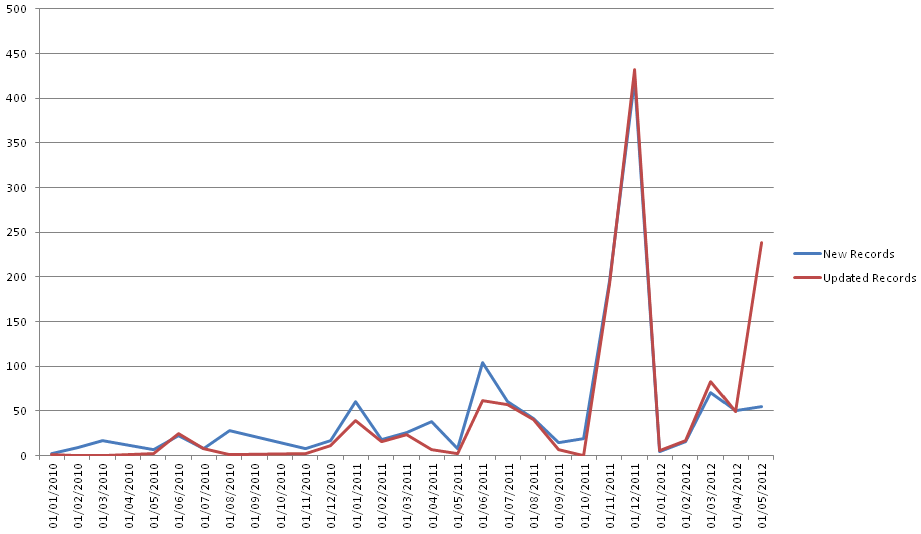
The chart shows that we have had a peak of over 400 changes in the month before our "go-live" (which was January 2012). This number of changes is likely to be either a new view (or a couple of new views!) or some mass omitting of columns (for example those whose descriptions start with "OBSOLETE" at R12!).

It's worth noting that by definition a row that's created is also updated so there is some "doubling up" in the numbers.

For those of you interested in the RAW data here is is (via Google Docs).

Here are our top customisations per view;

The views I've highlighted in red are completely new views we had to create to fill a gap. The INV_X_Dispensing view is a new view we created because of our customised dispensing module, all the other views we have created are reporting against standard Oracle Functionality (for example the RA_Customers_All view is simply the RA_Customers view without filtering out customers).

Hopefully I'll be able to publish all our customisations at some later date.

Friday, May 18, 2012

Oracle R12: Reporting Issues With Subledger Accounting

On 1st January this year we successfully migrated our existing R11 Oracle e-Business Suite installation to R12 and went live. The huge bulk of our reports had been upgraded to deal with the changes (largely now using Noetix Views) and with only about 100 reports remaining we were expecting to have completed the migration of existing reports and the creation of any new reports by the end of June 2012 (I'm writing this at the end of the May).

One of the process changes that was made as part of the R12 upgrade project was to enable some rules in Subledger Accounting. These are fairly simple rules and it probably helps to give an example so here goes;

A purchase order is raised for Item 7426-4 and then journalled into the GL (via the SLA). The original GL code defined with the purchase order line is;

2.001.9999.0000.0000.0000

It's not really important what the segments mean, but suffice to say when the final transaction is posted to the GL the account code has changed (by an SLA rule) to;

2.000.11111.0000.FOIL.0000

Looking at the lines in the GL (in Oracle) we see;
GL Journal Lines Showing the New Account Segments

From a Finance perspective this is good news as it dramatically reduces the chance of something being miss-coded by ignoring the codes the user has entered and replacing them with some pre-defined values.

However from a reporting standpoint this is a complete and total nightmare.

Why? Because the GL account code changes are not rolled back into the values defined for the Purchase Order. This means that if we are using the GL Account code in order to break down spending, which we are, then the only "true" value is in the GL.

On it's own this wouldn't be an issue except when you combine it with two others;
  1. Subledger records in XLA_Distribution_Links only allow a GL Line to be linked to a *single* external entity. Thus if, for example, you want GL Lines with their Purchase Orders on a report (for example a Department Spend Report) then you need to look both at XLA_Distribution_Links that are linked directly to purchase orders, then those that are linked to invoices (which in turn are linked to purchase orders), then those lines which are linked to inventory transactions and then linked to purchase orders, etc. In short a relatively simple query against PO.PO_DISTRIBUTIONS_ALL becomes a complete nightmare of multiple UNIONS
  2. The relationship between GL_JE_Lines and PO_Distributions_All isn't one-to-one. The tax line of distributions are merged into a single GL Line which means in XLA_Distribution_Links that single GL line is linked to every line on the purchase order.
Does anyone have a solution to this problem?!

Noetix: Extracting All Changes To a NoetixView To A Single File

NOTE: Last update, adding in some more information to the report, new version 0.9.2. It's now a requirement that you use this script to Omit Columns (makes the SQL much more readable, and reduces the amount of code that needs to be updated when Noetix update their processes - as they did at 6.0.2).

The purpose of this script is to combine all the changes made by a specific group of users to a single NoetixView template (in the tables N_View_Column_Templates, N_View_Table_Templates, and N_View_Where_Templates) into a single file split into four sections according to the template below;

-- NOETIX VIEW UPDATE TEMPLATE V0.9.1
-- NOTE: All changes to a single Noetix view should be included in one file (base view changes
--   should be in a separate file)
--
@utlspon

-- Section 1: Removing existing columns, queries, etc use a single update where possible

-- Section 2: Table (and Where clause) additions. Group by the change, not the type (i.e. add the
--   first table, then add the where clauses for the first table, then the second table, then the
--   where clauses for the second table, etc)

-- Section 3: Column Additions (in alphabetical order of Column_Label)

-- Section 4: Updates

COMMIT;

@utlspoff
 

The script is available here (via Google Docs), because it's quite long I've not copied/ pasted it into this blog.

Just to give you some idea we have approximately 3,000 files, the aim of using this script is to reduce this to a more manageable number (in the ten's).

The newly announced NoetixViews Workbench will (hopefully) further reduce the need for these legacy files.