Pages

Tuesday, May 22, 2012

Noetix Customisations (Per Month)

We are in the final stages of completing our R11 to R12 migration project and I thought it would be useful (because someone asked) to talk about the Customisations we have made to NoetixViews during the course of the project.

These are changes that you could submit to Noetix to be covered by a Noetix Customisation Maintenance (NCM) agreement (i.e. standard changes to views/ columns).

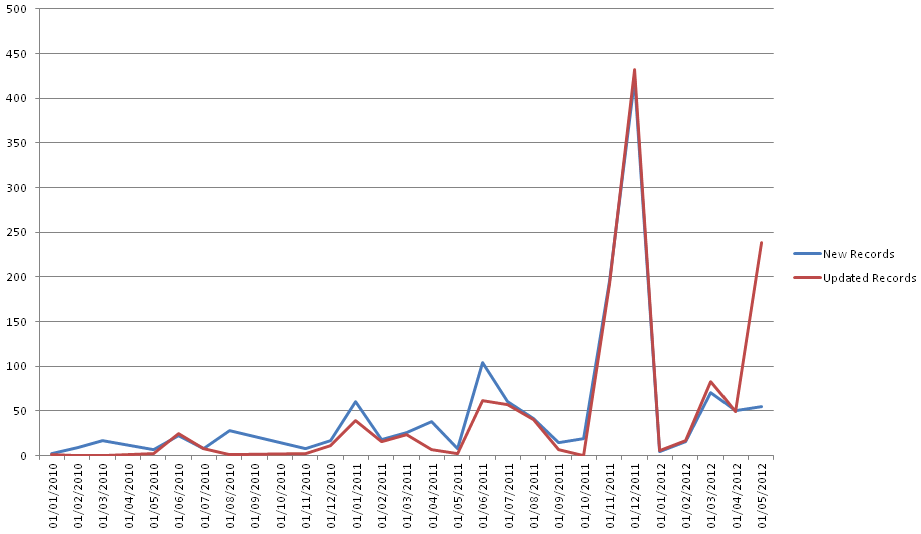
Changes Per Month
The chart shows that we have had a peak of over 400 changes in the month before our "go-live" (which was January 2012). This number of changes is likely to be either a new view (or a couple of new views!) or some mass omitting of columns (for example those whose descriptions start with "OBSOLETE" at R12!).

It's worth noting that by definition a row that's created is also updated so there is some "doubling up" in the numbers.

For those of you interested in the RAW data here is is (via Google Docs).

Here are our top customisations per view;

The views I've highlighted in red are completely new views we had to create to fill a gap. The INV_X_Dispensing view is a new view we created because of our customised dispensing module, all the other views we have created are reporting against standard Oracle Functionality (for example the RA_Customers_All view is simply the RA_Customers view without filtering out customers).

Hopefully I'll be able to publish all our customisations at some later date.

Friday, May 18, 2012

Oracle R12: Reporting Issues With Subledger Accounting

On 1st January this year we successfully migrated our existing R11 Oracle e-Business Suite installation to R12 and went live. The huge bulk of our reports had been upgraded to deal with the changes (largely now using Noetix Views) and with only about 100 reports remaining we were expecting to have completed the migration of existing reports and the creation of any new reports by the end of June 2012 (I'm writing this at the end of the May).

One of the process changes that was made as part of the R12 upgrade project was to enable some rules in Subledger Accounting. These are fairly simple rules and it probably helps to give an example so here goes;

A purchase order is raised for Item 7426-4 and then journalled into the GL (via the SLA). The original GL code defined with the purchase order line is;

2.001.9999.0000.0000.0000

It's not really important what the segments mean, but suffice to say when the final transaction is posted to the GL the account code has changed (by an SLA rule) to;

2.000.11111.0000.FOIL.0000

Looking at the lines in the GL (in Oracle) we see;
GL Journal Lines Showing the New Account Segments

From a Finance perspective this is good news as it dramatically reduces the chance of something being miss-coded by ignoring the codes the user has entered and replacing them with some pre-defined values.

However from a reporting standpoint this is a complete and total nightmare.

Why? Because the GL account code changes are not rolled back into the values defined for the Purchase Order. This means that if we are using the GL Account code in order to break down spending, which we are, then the only "true" value is in the GL.

On it's own this wouldn't be an issue except when you combine it with two others;
  1. Subledger records in XLA_Distribution_Links only allow a GL Line to be linked to a *single* external entity. Thus if, for example, you want GL Lines with their Purchase Orders on a report (for example a Department Spend Report) then you need to look both at XLA_Distribution_Links that are linked directly to purchase orders, then those that are linked to invoices (which in turn are linked to purchase orders), then those lines which are linked to inventory transactions and then linked to purchase orders, etc. In short a relatively simple query against PO.PO_DISTRIBUTIONS_ALL becomes a complete nightmare of multiple UNIONS
  2. The relationship between GL_JE_Lines and PO_Distributions_All isn't one-to-one. The tax line of distributions are merged into a single GL Line which means in XLA_Distribution_Links that single GL line is linked to every line on the purchase order.
Does anyone have a solution to this problem?!

Noetix: Extracting All Changes To a NoetixView To A Single File

NOTE: Last update, adding in some more information to the report, new version 0.9.2. It's now a requirement that you use this script to Omit Columns (makes the SQL much more readable, and reduces the amount of code that needs to be updated when Noetix update their processes - as they did at 6.0.2).

The purpose of this script is to combine all the changes made by a specific group of users to a single NoetixView template (in the tables N_View_Column_Templates, N_View_Table_Templates, and N_View_Where_Templates) into a single file split into four sections according to the template below;

-- NOETIX VIEW UPDATE TEMPLATE V0.9.1
-- NOTE: All changes to a single Noetix view should be included in one file (base view changes
--   should be in a separate file)
--
@utlspon

-- Section 1: Removing existing columns, queries, etc use a single update where possible

-- Section 2: Table (and Where clause) additions. Group by the change, not the type (i.e. add the
--   first table, then add the where clauses for the first table, then the second table, then the
--   where clauses for the second table, etc)

-- Section 3: Column Additions (in alphabetical order of Column_Label)

-- Section 4: Updates

COMMIT;

@utlspoff
 

The script is available here (via Google Docs), because it's quite long I've not copied/ pasted it into this blog.

Just to give you some idea we have approximately 3,000 files, the aim of using this script is to reduce this to a more manageable number (in the ten's).

The newly announced NoetixViews Workbench will (hopefully) further reduce the need for these legacy files.

Thursday, April 26, 2012

Installing Windows 8 (32-bit) Under VMware Fusion

The first thing that you'll probably notice if you've (like me) been tinkering around with pre-release Microsoft Operating Systems for a while is the appearance of a new "logo" on this version of the software which seems interesting if nothing else.

First off I've configured the VM with 2Gb memory, 4 processors, and a 10gb Hard Drive (it's not like I'm going to be doing any serious amount of work on it). I'm using VMware Fusion 4.1.2 (683185) which I'm pretty certain is the latest version.

The base machine is a Mac BookPro running version Lion 10.7.3 with a 2.2GHz Intel i7 with 8GB of RAM. More than adequate for the task!

The first step was to download the ISO image from Microsoft's MSDN website. I'm going to use the 32-bit version (as the 64-bit version doesn't seem to work in Fusion - see here). I'm not using the public images, I'm using the ones from the MSDN website. Are they the same? No idea. The name of the file is;

en_windows_8_consumer_preview_with_apps_x86_dvd_811827.iso

If that helps, I'm going to connect the DVD drive in VMware Fusion to the image (rather than burning a CD, I imagine this is what everyone does ... but just in case).

When you first boot up you are presented with the following screen;
Windows 8 Release Candidate - Windows Setup Screen
Click "Next";
Windows 8 release Candidate - Windows Setup/ Install Now
Click "Install Now";
Windows 8 Consumer Preview - Product Key
Enter your product licensing key (available on MSDN) and click "Next";
Windows 8 Consumer Preview - License Terms
Click the checkbox to accept the terms (you're read it right?) and then click "Next";
Windows 8 Consumer Preview - Installation Type
Assuming that you are (like me) installing the software into a blank Virtual Machine click "Custom" (the bottom option);
Windows 8 Consumer Preview - Where do you want to install Windows?
Click "Next";
Windows 8 Consumer Preview - Installing Windows
There is nothing to do on this screen, just wait for the install the install to complete (shouldn't take that long). The system will then reboot and you'll see various messages at the bottom of the screen like "Preparing", "Getting devices ready", and then finally "restarting your PC".

After the machine has restarted and then you'll be presented with the following screen;
Windows 8 Consumer Preview - Personlize
First of all it's nice to see American English hard-coded into the application. I just can't get enough of that. But then it is only a "consumer preview"! My first reaction when being asked by Windows to "pick a colour I like" is to be filled with absolute dread about what effect this will have on the colouring of the interface. My mind is filled with garish windows styles which, because I said I "liked" the colour here, would be with me forever ... But still I just picked the colour on the left (Teal?), entered my PC name, and clicked "Next";
Windows 8 Consumer Preview - Settings
Because this is only a test and, fundamentally, I have no problems with Microsoft hoovering up as much information as they need during the public preview so long as the final product doesn't do any such hoovering without my consent I'm going to "Use express settings" (and then regret it later at my leisure);
Windows 8 Consumer Preview - Sign in to your PC
I'm going to try a gmail address that I know isn't already linked to a Microsoft account (which I guess will be the typical setup). Enter the email address you wish to use and click "Next";
Windows 8 Consumer Preview - Set up a Microsoft Account
This dialog will only appear if you're setting up a new account. If you have already got a Microsoft Account associated with your email account then you'll see something like;
Windows 8 Consumer Preview - Enter your Microsoft Account Password
After this dialog a couple of dialogs flash by while the account is created and the system is "Preparing Windows".

Then you're presented with your new "Start" screen;
Windows 8 Consumer Preview - Start Screen
 And you're done.

NOTE: I now installed VMware Tools (the Windows 7 version) and it all worked perfectly including with Unity desktop. The whole process of doing the install took around 30 minutes which would have been a lot quicker if I'd not had to grab all these screen shots!
Windows 8 x64 Consumer Preview vs VMware Fusion? (DVD Driver Error)

UPDATE: This problem is specific to the 64-bit version of the installation, if you want to play-around with Windows 8 you can use the 32-bit version and you're fine. See here.

Just a quick post to show off how it seems to be impossible to install Microsoft's Windows 8 Consumer Preview into a virtual machine (I'm using VMware Fusion on my Mac).

First off I've configured the VM with 2Gb memory, 4 processors, and a 10gb Hard Drive (it's not like I'm going to be doing any serious amount of work on it). I'm using VMware Fusion 4.1.2 (683185) which I'm pretty certain is the latest version.

The base machine is a Mac BookPro running version Lion 10.7.3 with a 2.2GHz Intel i7 with 8GB of RAM. More than adequate for the task!

The first step was to download the ISO image from Microsoft's MSDN website. I'm going to use the 64-bit version. I'm not using the public images, I'm using the ones from the MSDN website. Are they the same? No idea. The name of the file is;

en_windows_8_consumer_preview_with_apps_x64_dvd_811821.iso

If that helps, I'm going to connect the DVD drive in VMware Fusion to the image (rather than burning a CD, I imagine this is what everyone does ... but just in case).

On booting after a few seconds delay I'm presented with the first screen;
Windows 8 Consumer Preview - First Dialog
The top menu, Language to Install, only includes US English (starting as they might wish to go on I guess ... ;-), but the second drop down allows me to specify UK English format for Times and Currencies. Clicking "Next" then takes me to this screen;
Windows 8 Consumer Preview - Install Now
Just one button "Install now". I really think the only purpose of this screen is to show you how simple the process is now. Given that the "Install Now" button is only a little larger than the "Next" button the previous screen why not just combine them? There seems to be enough space for the "Repair your computer" link button as well ... why two screens? Anyway, clicking "Install now";
Windows 8 Consumer Preview - Drive Install
And this is where everything starts to get a little bit Windows 95. The message being displayed is titled "Load Driver" and reads;

"A DVD driver your PC needs is missing. If you have a CD, DVD, or USB flash drive with the driver on it, pelase insert it now.


NOTE: If the installation media for Windows is in the DVD drive, you can safely remove it for this step".

Now help buttons, no explanation of why if I can get this far and suddenly I'm having a driver problem with the DVD drive which has the Windows Media on it. No "checking online for drivers" either, which is a bit of a surprise, but at least I should be happy that it's not asking for the floppy disk.

Unfortunately, as a long-time VMware Workstation user I find the lack of some controls in VMware Fusion a little frustrating, for example would using a SCSI DVD work better than the IDE one? With Fusion there doesn't' seem to be a way to find out ...

NOTE: Ironically Windows 8 Server seems to work and install perfectly without any issues, which is just odder and odder as you'd assume the install process was the same between the two systems.


Wednesday, April 25, 2012

Noetix: Release 11 to Release 12 Migration (Replacing Obsolete Views)

While migration to R12 with Noetix is very easy and relatively painless in some areas the significant changes in Inventory between the two versions make it practically impossible for Noetix views to handle the migration "invisibly" (as they tend to do in other areas like Account Payable).

This is especially true if your organisation, like mine, is taking this opportunity to do a bit of restructuring the system so that, for example, rather than using stock being in a particular warehouse to mean that it's a retained sample achieving the same thing using statuses and getting rid of the warehouse.

Here is a list of R11 and R12 Noetix View Templates with "suggested" replacements. It's not a complete list, but it is the list we have been working of for all our reports;

View Label >>>> Recommended Replacement
GMP_Forecast_Details >>>> INV_Forecasts
GMI_Unallocated_Inventory >>>> INV_Unallocated_Inventory view
GMI_Onhand_Inv_By_Lot  >>>> INV_Item_Onhand_By_Lot*
GMI_Onhand_Inv_By_Location  >>>> INV_Onhand_Quantities*
GMI_Month_End_Inventory  >>>> INV_Period_Close_Details*
GMI_Item_Master  >>>> INV_Items and INV_Item_Inventory_Attributes
GMI_Inv_Transactions  >>>> INV_Transactions or INV_Transaction_Details
GMF_Update_Subledger  >>>> GMF_SLA_Cost_Subledger
GMF_Cost_Warehouse_Assoc  >>>> GMF_Cost_Organization_Assc
GMF_Order_Details_Base  >>>> GMF_SLA_Cost_Subledger

*- The migration from R11 Process Manufacturing Inventory to R12 Common Inventory for us has been less than smooth and has not been helped by a few, dare I say it, "obvious" issues that Noetix should have addressed prior to us attempting the upgrade.

The most obvious issue was that in R12 there was no view that would tell us the lot number, the location, and the onhand quantity. The best we could do is two out of three. I just cannot imagine any organisation out there not wanting to see all three on the same report. This led to us having to make significant customisations in order for the migration path to actually be a migration path.

For example looking at the view template INV_Item_Onhand_By_Lot we have added the following customisation columns (with some additional information where appropriate);

Days_Since_First_Transaction
ITEM  (Table Alias= ITEM, Column expression=ITEM) << Flexfield
Item_Type  (Table Alias= ITEM, Column expression=ITEM_TYPE)
Item_Type_Code  (Table Alias= ITEM, Column expression=ITEM_TYPE)
LOCT  (Table Alias= LOCT, Column expression=LOCT) << Flexfield
Material_Status  (Table Alias= MMST, Column expression=DESCRIPTION)
Material_Status_Code  (Table Alias= MMST, Column expression=STATUS_CODE)
Organization_Code  (Table Alias= MPARM, Column expression=ORGANIZATION_CODE)


Here is our list of customisation to the GMI_Onhand_Inv_By_Lot view;
Batch_Id 
Company_Code  (Table Alias= XMAP, Column expression=COMPANY_CODE)
Company_Name  (Table Alias= XMAP, Column expression=COMPANY_NAME)
Days_Since_First_Transaction
Inventory_Class  (Table Alias= ITEM, Column expression=INV_CLASS)
Item_Cost_Class  (Table Alias= ITEM, Column expression=ITEMCOST_CLASS)
Item_Id  (Table Alias= ITEM, Column expression=Item_Id)
Lots_MFD_Flag  (Table Alias= LOTS, Column expression=DECODE(LOTS.DELETE_MARK,0,'N',1,'Y'))
Qc_Hold_Reason_Code  (Table Alias= LOINV, Column expression=QCHOLD_RES_CODE)


I've highlighted the location flexfield which if you look at the Noetix columns for the original view seems to directly map to the INVENTORY_LOCATION_CODE. There seems to be no mapping for this column down the migration path we were recommended to take.

I'm currently going through the process of sorting out our customisations (something that I'm sure will greatly relieve Noetix Support!) and I'll be publishing as much as I possibly can of the work we've done (including the difference between Lot Status and Material_Status which I'm sure will intrigue and worry people).

Tuesday, April 17, 2012

Noetix: Problems with INV_Reservations Template Missing Records

As we've just (at the beginning of the year) moved to R12 we've only just started exploiting the Reservations functionality and, as is often the case, when we started using the new functionality we wanted to report on it.

Noetix provides a view (descended from the INV_Reservations) template that seemed to meet most of our needs and we produced a few reports based on it. Yesterday one of our users reported an issue whereby only certain reservations were being included in the total reserved;

Item Reservations Window (Release 12)
 As you can see we have five Reservation amounts (1, 1, 2, 2, .25), now the total being reported by the Noetix view was 3.25 (actual total is 6.25).

After a bit of investigation it became clear that what the view was adding up the distinct values (1 + 2 + .25 = 3.25) and I'm sure you'll spot that the most likely reason behind this is the use of a UNION rather than a UNION ALL in the SQL.

Looking at the SQL behind the view it shows that both the INV_Reservations and the INV_Reservations_Base views have UNIONS and in order to fix the issue you need to replace them with UNION ALL's. This issue has been raised with Noetix and is bug 29598.

The script to fix it is;

UPDATE n_view_query_templates
   SET union_minus_intersection = 'UNION ALL',
       last_update_date = TO_DATE('17-APR-2012'),
       last_updated_by = 'B29598'
 WHERE view_label like 'INV_Reservations_Base'
   AND union_minus_intersection = 'UNION'
;

UPDATE n_view_query_templates
   SET union_minus_intersection = 'UNION ALL',
       last_update_date = TO_DATE('17-APR-2012'),
       last_updated_by = 'B29598'
 WHERE view_label like 'INV_Reservations'
   AND union_minus_intersection = 'UNION'
;

You'll need to call this from XU2.